- Don’t miss your chance to experience Discovery Summit Europe at our best available rate! Early bird registration through 31 Oct.
- Graph Builder Toolbar streamlines interactive graphing. Creates shortcuts on Report and GraphBuilder Helpers toolbars. Download and install the extension.
- JMP will suspend normal business operations for our Rest and Recharge Day on Friday, October 2, 2026.
Regular business hours will resume on Monday, October 5, 2026.
- Subscribe to RSS Feed
- Mark Topic as New
- Mark Topic as Read
- Float this Topic for Current User
- Bookmark
- Subscribe
- Mute
- Printer Friendly Page
Discussions
Solve problems, and share tips and tricks with other JMP users.- User Community
- :
- Discussions
- :
- Re: how to optimize the cpu/memory usage in jmp on Windows

- Mark as New
- Bookmark
- Subscribe
- Mute
- Subscribe to RSS Feed
- Get Direct Link
- Report Inappropriate Content
how to optimize the cpu/memory usage in jmp on Windows
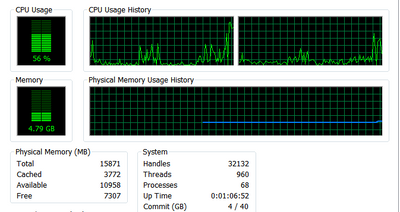
hi, I often have to handle data tables with few million rows and 20s to 30s columns. The frustration is whenever I need to edit a plot basing on this big table, the system start the waiting sign(turning ring) which take 1 to few minutes. It normally consume ~60% CPU and few GB memory if I look at the "task manager". Luckily I am using 64bit jmp on 64 bit Win7 workstation which has enough resources but I still have to wait and waste time on waiting.
I hope there is an option/method to optimize the cpu/memory usage or just hold the refreshing till user let it to do so.
Thanks!
Accepted Solutions
- Mark as New
- Bookmark
- Subscribe
- Mute
- Subscribe to RSS Feed
- Get Direct Link
- Report Inappropriate Content
Re: how to optimize the cpu/memory usage in jmp on Windows
Compress Selected Columns
JMP lets you compress columns in a data table to minimize the size of the file and reduce the
amount of memory required to analyze data. This feature is helpful when numeric columns
contain many small integers or when any column contains fewer than 255 unique values. For
example, compressing columns in a data table with 389 columns and 85,000 rows might
decrease the file size from 250MB to 33MB, depending on the type of data.
dt = Open( "$SAMPLE_DATA/Big Class.jmp" );
dt << Compress Selected Columns(
{:age, :sex, :height, :weight}
);


- Mark as New
- Bookmark
- Subscribe
- Mute
- Subscribe to RSS Feed
- Get Direct Link
- Report Inappropriate Content
Re: how to optimize the cpu/memory usage in jmp on Windows
The simplest thing is to work with a random subset of your data while you're tuning a plot appearance, then save the script and reapply it to your full data table. Otherwise, strategies probably depend on the specific platform and task you're doing.
- Mark as New
- Bookmark
- Subscribe
- Mute
- Subscribe to RSS Feed
- Get Direct Link
- Report Inappropriate Content
Re: how to optimize the cpu/memory usage in jmp on Windows
thanks, I will try to use small subset of my data to work out the script then.
- Mark as New
- Bookmark
- Subscribe
- Mute
- Subscribe to RSS Feed
- Get Direct Link
- Report Inappropriate Content
Re: how to optimize the cpu/memory usage in jmp on Windows
Compress Selected Columns
JMP lets you compress columns in a data table to minimize the size of the file and reduce the
amount of memory required to analyze data. This feature is helpful when numeric columns
contain many small integers or when any column contains fewer than 255 unique values. For
example, compressing columns in a data table with 389 columns and 85,000 rows might
decrease the file size from 250MB to 33MB, depending on the type of data.
dt = Open( "$SAMPLE_DATA/Big Class.jmp" );
dt << Compress Selected Columns(
{:age, :sex, :height, :weight}
);

- Mark as New
- Bookmark
- Subscribe
- Mute
- Subscribe to RSS Feed
- Get Direct Link
- Report Inappropriate Content
Re: how to optimize the cpu/memory usage in jmp on Windows


- Mark as New
- Bookmark
- Subscribe
- Mute
- Subscribe to RSS Feed
- Get Direct Link
- Report Inappropriate Content
Re: how to optimize the cpu/memory usage in jmp on Windows
CSV import does have the column compression as an option (off by default):
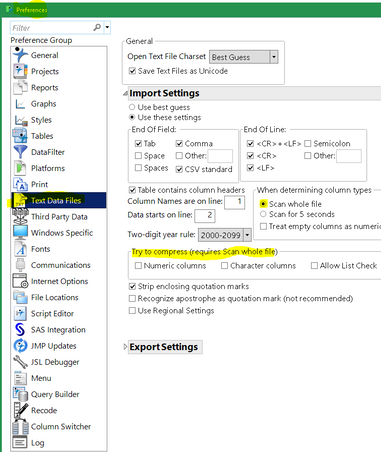
JMP has two kinds of compression for data tables. This one is the column compression and works by noticing a limited set of distinct values and using one of JMP's alternate column formats. This will make the in-memory footprint smaller.
The other kind of compression uses a zip-like mechanism to compress columns. This can be slow to open and even slower to save, and offers no in-memory benefit...only on disk. It is on the red triangle, something like compress when saved. Particularly helpful for huge tables of repeating values.
Both can be used together.
Recommended Articles
- © 2026 JMP Statistical Discovery LLC. All Rights Reserved.
- Terms of Use
- Privacy Statement
- Contact Us