- Don’t miss your chance to experience Discovery Summit Europe at our best available rate! Early bird registration through 31 Oct.
- Graph Builder Toolbar streamlines interactive graphing. Creates shortcuts on Report and GraphBuilder Helpers toolbars. Download and install the extension.
- Subscribe to RSS Feed
- Mark Topic as New
- Mark Topic as Read
- Float this Topic for Current User
- Bookmark
- Subscribe
- Mute
- Printer Friendly Page
Discussions
Solve problems, and share tips and tricks with other JMP users.- User Community
- :
- Discussions
- :
- can the excel import wizard pull in data from the excel file name?

- Mark as New
- Bookmark
- Subscribe
- Mute
- Subscribe to RSS Feed
- Get Direct Link
- Report Inappropriate Content
can the excel import wizard pull in data from the excel file name?
I am using the excel import wizard to pull in some excel data and some of the information I need is encoded in the excel file name. Is there any way, using the import wizard, to pull in information from the file name? The wizard by default uses the worksheet name for the JMP table name, but that's not what I am looking for in this case (all my worsheets are 'sheet1'). Ideally I want to 1) name the JMP table based on the excel file name or alternatively 2) create a source column that contains the excel file name.
Or do I need to write a script to do this?
Accepted Solutions


- Mark as New
- Bookmark
- Subscribe
- Mute
- Subscribe to RSS Feed
- Get Direct Link
- Report Inappropriate Content
Re: can the excel import wizard pull in data from the excel file name?
If you are using JMP 14, you can use File->Multiple File Import. MFI uses a directory and a file name pattern. The file name pattern can be the actual file name. Check the box to change the pattern. In your case, you'll only select a single file, so the Stack Similar Files choice won't make a difference. You won't need the Select files by size or by date and time filters either. On the right, you can see the number of files available after each filter is applied.
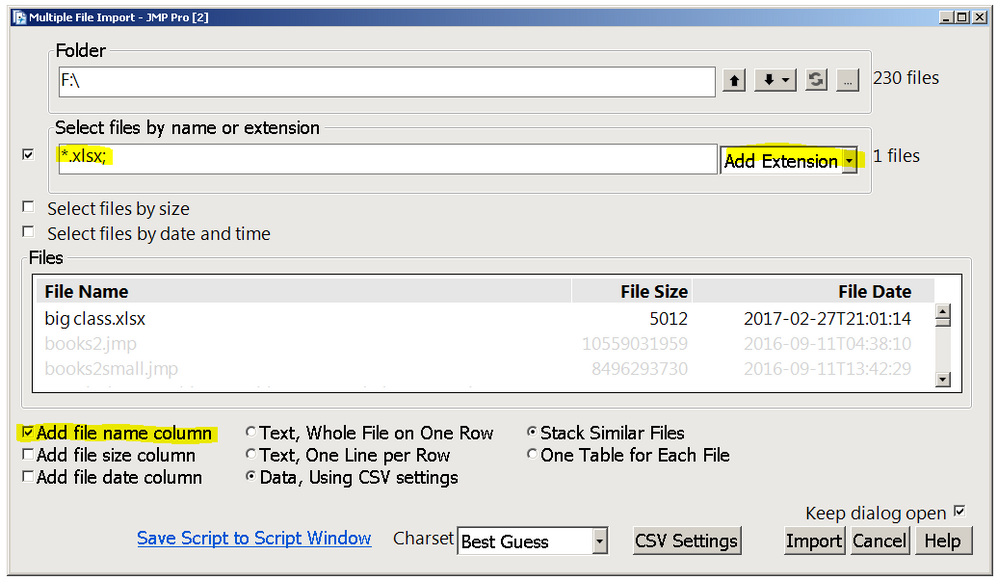
You can add the File Name column or use the table name or use the Files table variable. The Source table variable contains the JSL to run the import again.
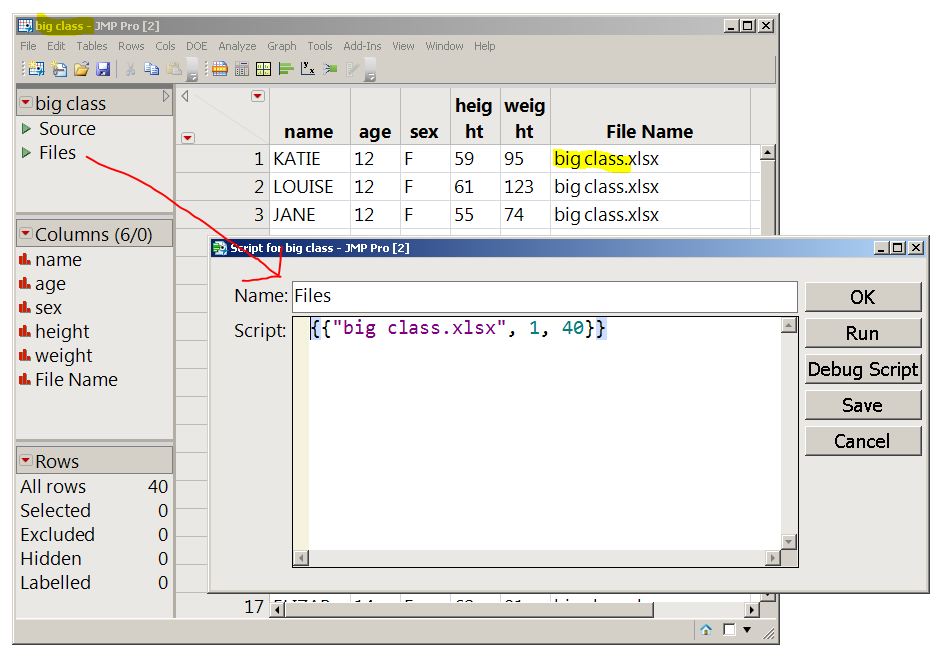
If multiple files were stacked, that list would be longer. For example,
fileList = dt<<getTableVariable("Files");
show(fileList);
fileList = "{{\!"gpsLog3.txt\!", 1, 354331}, {\!"gpslog.txt\!", 354332, 71551}}";
means the gpsLog3 file starts on row 1 and has 354331 rows and the gpslog.txt file starts on row 354332 and has 71551 rows.

- Mark as New
- Bookmark
- Subscribe
- Mute
- Subscribe to RSS Feed
- Get Direct Link
- Report Inappropriate Content
Re: can the excel import wizard pull in data from the excel file name?
@timog ,
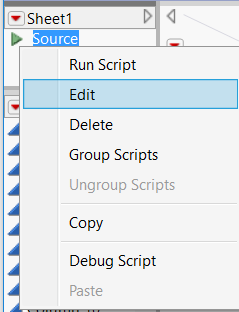
While writing a script would definitely offer a lot of control, if all you need is to see the file name, after you import the file into JMP, if you navigate to the following "source" as shown below and click "Edit", a new window should pop up which will give you the script that JMP used to import the file. However, more importantly, it will also provide the file name.
Uday
- Mark as New
- Bookmark
- Subscribe
- Mute
- Subscribe to RSS Feed
- Get Direct Link
- Report Inappropriate Content
Re: can the excel import wizard pull in data from the excel file name?
If you are using JMP 14, you can use File->Multiple File Import. MFI uses a directory and a file name pattern. The file name pattern can be the actual file name. Check the box to change the pattern. In your case, you'll only select a single file, so the Stack Similar Files choice won't make a difference. You won't need the Select files by size or by date and time filters either. On the right, you can see the number of files available after each filter is applied.
You can add the File Name column or use the table name or use the Files table variable. The Source table variable contains the JSL to run the import again.
If multiple files were stacked, that list would be longer. For example,
fileList = dt<<getTableVariable("Files");
show(fileList);
fileList = "{{\!"gpsLog3.txt\!", 1, 354331}, {\!"gpslog.txt\!", 354332, 71551}}";
means the gpsLog3 file starts on row 1 and has 354331 rows and the gpslog.txt file starts on row 354332 and has 71551 rows.

- Mark as New
- Bookmark
- Subscribe
- Mute
- Subscribe to RSS Feed
- Get Direct Link
- Report Inappropriate Content
Re: can the excel import wizard pull in data from the excel file name?
EXACTLY! That was what I was here to say - MFI has been an incredible productivity gain for me. I have a piece of custom measurement equipment that outputs a CSV file per pert measured, requiring me to concatenate all of those files later. We only grab the data from this measurement a few times per year (generally the 'go/no go' functionality is adequate) ... and the contents of the file are of little value out of context. Fortunately the file name is rich with detail, so using MFI to import everything then having a script to work on the files has made things very simple (to the point that I haven't had to personally touch the files in nearly a year!)
Recommended Articles
- © 2026 JMP Statistical Discovery LLC. All Rights Reserved.
- Terms of Use
- Privacy Statement
- Contact Us