- Don’t miss your chance to experience Discovery Summit Europe at our best available rate! Early bird registration through 31 Oct.
- Graph Builder Toolbar streamlines interactive graphing. Creates shortcuts on Report and GraphBuilder Helpers toolbars. Download and install the extension.
- Subscribe to RSS Feed
- Mark Topic as New
- Mark Topic as Read
- Float this Topic for Current User
- Bookmark
- Subscribe
- Mute
- Printer Friendly Page
Discussions
Solve problems, and share tips and tricks with other JMP users.- User Community
- :
- Discussions
- :
- Two different Spec limits for Process Capability based on the value in one colum...

- Mark as New
- Bookmark
- Subscribe
- Mute
- Subscribe to RSS Feed
- Get Direct Link
- Report Inappropriate Content
Two different Spec limits for Process Capability based on the value in one column.
I use one measurement process to assess the capability of two different products on our production line. For various reasons, the spec limits for the two products are different but the measurement data is combined with one field being used to indicate which product is being processed.
I am trying to generate a simple, tabular process capability report that splits the data into two separate reports based on the product type in such a way that I can apply different specs to the two groups. I have called them Product A and Product B in this example. My thought was to change the script to look like the example below but the resulting Capability report uses the second set of Spec Limits for both product groups. The data come from the same source and I need to track them together so I don't really want to double-up the process with filters on the data source. Any Ideas please?
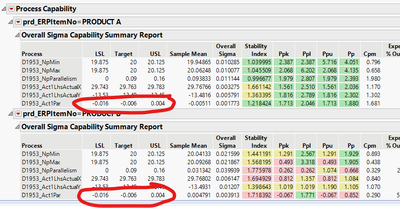
Process Capability(
	SendToByGroup( Bygroup Default ),
	Process Variables( :D1953_NpMin, :D1953_NpMax, :D1953_NpParallelism, :D1953_Act1LhsActualX, :D1953_Act1LhsActualY, :D1953_Act1Par ),
	SendToByGroup(
		{:prd_ERPItemNo == "PRODUCT A"},
		Spec Limits(
			:D1953_NpMin( LSL( 19.875 ), Target( 20 ), USL( 20.125 ) ), :D1953_NpMax( LSL( 19.875 ), Target( 20 ), USL( 20.125 ) ),
			:D1953_NpParallelism( LSL( 0 ), Target( 0.09 ), USL( 0.16 ) ), :D1953_Act1LhsActualX( LSL( 29.743 ), Target( 29.763 ), USL( 29.783 ) ),
			:D1953_Act1LhsActualY( LSL( -13.53 ), Target( -13.49 ), USL( -13.45 ) ), :D1953_Act1Par( LSL( -0.016 ), Target( -.006 ), USL( 0.004 ) )
		),
		{:prd_ERPItemNo == "PRODUCT B"},
		Spec Limits(
			:D1953_NpMin( LSL( 19.875 ), Target( 20 ), USL( 20.125 ) ), :D1953_NpMax( LSL( 19.875 ), Target( 20 ), USL( 20.125 ) ),
			:D1953_NpParallelism( LSL( 0 ), Target( 0.09 ), USL( 0.16 ) ), :D1953_Act1LhsActualX( LSL( 29.743 ), Target( 29.763 ), USL( 29.783 ) ),
			:D1953_Act1LhsActualY( LSL( -13.53 ), Target( -13.49 ), USL( -13.45 ) ), :D1953_Act1Par( LSL( -0.008 ), Target( .002 ), USL( 0.012 ) )
		)
	),
	Moving Range Method( Average of Moving Ranges ),
	Capability Box Plots( 0 ),
	Overall Sigma Summary Report( 1 ),
	Goal Plot( 0 ),
	Capability Index Plot( 0 ),
	Process Performance Plot( 0 ),
	By( :prd_ERPItemNo )
);
Accepted Solutions


- Mark as New
- Bookmark
- Subscribe
- Mute
- Subscribe to RSS Feed
- Get Direct Link
- Report Inappropriate Content
Re: Two different Spec limits for Process Capability based on the value in one column.
Hi @RichardSlack ,
There doesn't look to be an easy way to script/command to bygroup - but if you use a separate spec limit table it will work, see here.
Thanks,
Ben
- Mark as New
- Bookmark
- Subscribe
- Mute
- Subscribe to RSS Feed
- Get Direct Link
- Report Inappropriate Content
Re: Two different Spec limits for Process Capability based on the value in one column.
Hi @RichardSlack ,
Can you provide the data table to work with? Or find a similar example in the sample index?
Thanks,
Ben
- Mark as New
- Bookmark
- Subscribe
- Mute
- Subscribe to RSS Feed
- Get Direct Link
- Report Inappropriate Content
Re: Two different Spec limits for Process Capability based on the value in one column.
JMP Data Table attached

- Mark as New
- Bookmark
- Subscribe
- Mute
- Subscribe to RSS Feed
- Get Direct Link
- Report Inappropriate Content
Re: Two different Spec limits for Process Capability based on the value in one column.
Spec Limits are a Column Property, so if the data for the two products are in the same Column, they will inherit the same Spec Limits. Maybe there is a way around this using some clever scripting...but I would recommend simply splitting the column:
- Tables -> Split.
- Split By: your Product Type column (Product A or Product B).
- Split Column: your process data columns.
- "Keep All" other columns as needed
Would this work for you?
Edit: the answers below using a Spec Limit Table look like a better solution here, thanks Ben and Laura!
- Mark as New
- Bookmark
- Subscribe
- Mute
- Subscribe to RSS Feed
- Get Direct Link
- Report Inappropriate Content
Re: Two different Spec limits for Process Capability based on the value in one column.
I am able to do it with Distributions by performing a Process Capability with different spec limits for each grouped parameter and then saving the script to repeat the process later. Unfortunately this doesn't give me such a nice output to then transfer to an Excel report, where I need the numbers in tabular format. The Process Capability tool gives me the tabular output I need but seems to not allow separate spec limits between the two groups of data.
- Mark as New
- Bookmark
- Subscribe
- Mute
- Subscribe to RSS Feed
- Get Direct Link
- Report Inappropriate Content
Re: Two different Spec limits for Process Capability based on the value in one column.
Hi @RichardSlack ,
There doesn't look to be an easy way to script/command to bygroup - but if you use a separate spec limit table it will work, see here.
Thanks,
Ben
- Mark as New
- Bookmark
- Subscribe
- Mute
- Subscribe to RSS Feed
- Get Direct Link
- Report Inappropriate Content
Re: Two different Spec limits for Process Capability based on the value in one column.
It will be a bit long-winded to complete the spec table but it definitely seems to be the solution I was looking for. Many thanks!

- Mark as New
- Bookmark
- Subscribe
- Mute
- Subscribe to RSS Feed
- Get Direct Link
- Report Inappropriate Content
Re: Two different Spec limits for Process Capability based on the value in one column.
I wanted to let you know that if you are using JMP 19, the Process Capability platform now has the ability to do grouped process capability.
For example, the data below contains some cheese manufacturing data. It has 3 process variables: pH, Salt Concentration, and Moisture Content. It is organized by the grouping column, Cheese Type. There are 3 cheese types: Brie, Cheddar, and Swiss.

The specification limits for the cheese manufacturing data are in the Cheese Manufacturing Limits data table below. Notice that there are 9 sets of spec limits. One set for each of the 3 process variables for each of the 3 cheese types.

To analyze the capability of this grouped cheese manufacturing data, you can launch the Process Capability platform by adding the 3 process variables columns to the Y,Process role and Cheese Type column to the Grouping role. See the image of the launch dialog below.

Once you click OK, you will get a Spec Limits dialog to allow you to load your grouped spec limits data table.

Once you select the spec limits table and click OK, you will get a grouped Process Capability analysis that includes an Overall Sigma Capability Summary Report like the following:

I hope this helps.
Laura
P.S. Also... In JMP 19 the Manage Limits utility also works with grouped data that is organized with a grouping column.
- Mark as New
- Bookmark
- Subscribe
- Mute
- Subscribe to RSS Feed
- Get Direct Link
- Report Inappropriate Content
Re: Two different Spec limits for Process Capability based on the value in one column.
I am currently using 18 but I imagine we will get the update to 19 in the New Year.
Your JMP 19 is actually very similar to what I now have but is does seem to be just a little more straightforward than the route I have had to take.
Many thanks!
Recommended Articles
- © 2026 JMP Statistical Discovery LLC. All Rights Reserved.
- Terms of Use
- Privacy Statement
- Contact Us