Turn on suggestions
Auto-suggest helps you quickly narrow down your search results by suggesting possible matches as you type.
- Don’t miss your chance to experience Discovery Summit Europe at our best available rate! Early bird registration through 31 Oct.
- Graph Builder Toolbar streamlines interactive graphing. Creates shortcuts on Report and GraphBuilder Helpers toolbars. Download and install the extension.
Options
- Subscribe to RSS Feed
- Mark Topic as New
- Mark Topic as Read
- Float this Topic for Current User
- Bookmark
- Subscribe
- Mute
- Printer Friendly Page
Discussions
Solve problems, and share tips and tricks with other JMP users.- User Community
- :
- Discussions
- :
- Percent of Factor for "X and below"

Level XIII
- Mark as New
- Bookmark
- Subscribe
- Mute
- Subscribe to RSS Feed
- Get Direct Link
- Report Inappropriate Content
Percent of Factor for "X and below"
Dec 13, 2025 12:51 PM
(720 views)
Hi,
In JMP every row know to which bar it belongs in a bar graph. So, it's very easy to calculate % of Factor.
e.g. ratio of female and male students plotted versus age ("X"):
Names Default to Here(1);
dt = Open( "$SAMPLE_DATA/Big Class Families.jmp" );
Graph Builder(
	Variables( X( :age ), Overlay( :sex ) ),
	Elements(
		Bar(
			X,
			Bar Style( "Stacked" ),
			Summary Statistic( "% of Factor" )
		)
	)
);
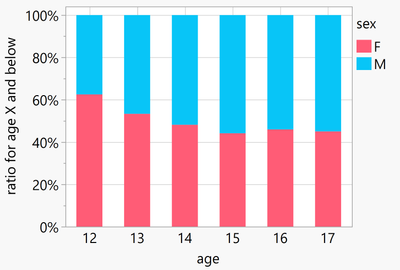
Is there an easy way to generate a plot showing the percentage of factors, with the ratio of female to male students plotted against age as "X and below"? So, for 12 years old, it would be the same ratio as above (5 vs. 3), and for 17 years old, it would be the total ratio of male and female students: 22 vs. 18.
1 ACCEPTED SOLUTION
Accepted Solutions
Level XIII
Solution
- Mark as New
- Bookmark
- Subscribe
- Mute
- Subscribe to RSS Feed
- Get Direct Link
- Report Inappropriate Content
Re: Percent of Factor for "X and below"
Workaround via summary table:
Names Default to Here(1);
dt = Open( "$SAMPLE_DATA/Big Class Families.jmp" );


dtsum = dt << Summary(Group( :age, :sex ));
dtsum << New Column( "N cumulative", Formula( Col Cumulative sum(:N Rows, :sex)));


Graph Builder(
	Variables( X( :age ), Y( :N cumulative  ), Overlay( :sex ) ),
	Elements(
		Bar(
			X,
			Y,
			Bar Style( "Stacked" ),
			Summary Statistic( "% of Factor" )
		)
	)
);
1 REPLY 1
Level XIII
Solution
- Mark as New
- Bookmark
- Subscribe
- Mute
- Subscribe to RSS Feed
- Get Direct Link
- Report Inappropriate Content
Re: Percent of Factor for "X and below"
Workaround via summary table:
Names Default to Here(1);
dt = Open( "$SAMPLE_DATA/Big Class Families.jmp" );


dtsum = dt << Summary(Group( :age, :sex ));
dtsum << New Column( "N cumulative", Formula( Col Cumulative sum(:N Rows, :sex)));


Graph Builder(
	Variables( X( :age ), Y( :N cumulative  ), Overlay( :sex ) ),
	Elements(
		Bar(
			X,
			Y,
			Bar Style( "Stacked" ),
			Summary Statistic( "% of Factor" )
		)
	)
);
Recommended Articles
- © 2026 JMP Statistical Discovery LLC. All Rights Reserved.
- Terms of Use
- Privacy Statement
- Contact Us