Don’t miss your chance to experience Discovery Summit Europe at our best available rate! Early bird registration through 31 Oct.
Image to Table JMP extension imports single or batch images as data tables. Useful to extract curves from pictures or convert image data to curve data to use in analyses like Functional Data Explorer. Download and install the extension.
Created:
Oct 6, 2021 01:58 PM
| Last Modified: Jun 10, 2023 4:37 PM(14466 views)
Hi,
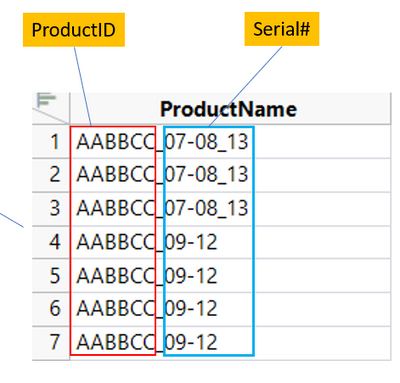
I have a table containing ProductName and I want to generate the OUTPUT column. The OUTPUT column a concatenation of ProductID with Serial#. How do I accurately parse the Serial# and create the OUTPUT column?
Serial # examples:
07-08_13 means Serial# 07, 08, 13
09-12 means Serial# 09, 10, 11, 12
01-03_05-08 means Serial# 01, 02, 03, 05, 06, 07, 08
Yes you can, but you will have to work the logic out as to when to add new rows, etc. What I suggest, is that what you do, is run the code as is, and then use