- Discovery Summit 2026: Early User Edition - September 23-24.Register. It's free.
- Graph Builder Toolbar streamlines interactive graphing. Creates shortcuts on Report and GraphBuilder Helpers toolbars. Download and install the extension.
- Subscribe to RSS Feed
- Mark Topic as New
- Mark Topic as Read
- Float this Topic for Current User
- Bookmark
- Subscribe
- Mute
- Printer Friendly Page
Discussions
Solve problems, and share tips and tricks with other JMP users.- User Community
- :
- Discussions
- :
- Is there a way to fix the size of an OutlineBox?


- Mark as New
- Bookmark
- Subscribe
- Mute
- Subscribe to RSS Feed
- Get Direct Link
- Report Inappropriate Content
Is there a way to fix the size of an OutlineBox?
Hi All,
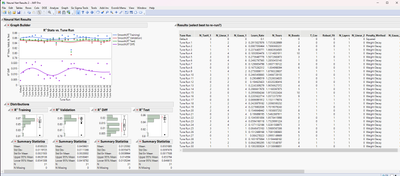
I have a script that pulls a data table and brings it into a window using the command dt<<Get As Report. This table has many columns and many rows. Unfortunately, it shows up in the window like this, it's really large and I don't want it to be this size:
Instead, I'd like to resize it automatically, to something more like this:
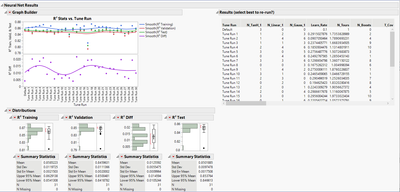
I found a thread here that is very similar to what I'm looking for, but not quite. I've tried sending commands like <<Set Max Size() or similar to the object that is the dt as a report, but then I don't get anything in my report window. I tried creating a Border Box(), but that doesn't work either.
Any ideas/suggestions are much appreciated.
Thanks!,
DS
Accepted Solutions

- Mark as New
- Bookmark
- Subscribe
- Mute
- Subscribe to RSS Feed
- Get Direct Link
- Report Inappropriate Content
Re: Is there a way to fix the size of an OutlineBox?
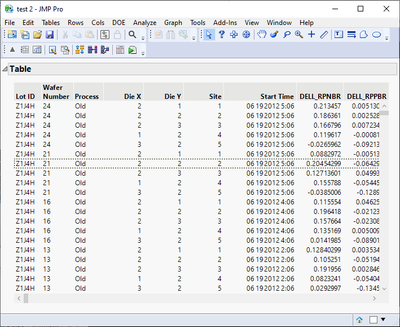
I think you want to fix the size of table box, not outlinebox
Names Default To Here(1);

dt = Open("$SAMPLE_DATA/Probe.jmp");

bb = dt << get as report;
// we need to modify the table box, not borderbox
(bb << child) << Set Scrollable(20, 5); // rows, columns

dt = New Window("test",
	Outline Box("Table",
		bb
	);
);
- Mark as New
- Bookmark
- Subscribe
- Mute
- Subscribe to RSS Feed
- Get Direct Link
- Report Inappropriate Content
Re: Is there a way to fix the size of an OutlineBox?
I think you want to fix the size of table box, not outlinebox
Names Default To Here(1);

dt = Open("$SAMPLE_DATA/Probe.jmp");

bb = dt << get as report;
// we need to modify the table box, not borderbox
(bb << child) << Set Scrollable(20, 5); // rows, columns

dt = New Window("test",
	Outline Box("Table",
		bb
	);
);
- Mark as New
- Bookmark
- Subscribe
- Mute
- Subscribe to RSS Feed
- Get Direct Link
- Report Inappropriate Content
Re: Is there a way to fix the size of an OutlineBox?
Hi @jthi ,
Thanks for the quick response and solution. Yes, it was actually the table box I wanted to fix the size of, but nothing I had tried worked, so I thought maybe it was the OutlineBox. Anyway, great solution, thank you!
DS
- Mark as New
- Bookmark
- Subscribe
- Mute
- Subscribe to RSS Feed
- Get Direct Link
- Report Inappropriate Content
Re: Is there a way to fix the size of an OutlineBox?
One thing you might want to change is to change the reference to table box from
(bb << child)to something like
bb[Table Box(1)]as it might be more robust option (when building something like this, usually it is a good idea to almost always explore either properties or XML)
Recommended Articles
- © 2026 JMP Statistical Discovery LLC. All Rights Reserved.
- Terms of Use
- Privacy Statement
- Contact Us