cancel
Showing results for 
Show  only  | Search instead for 
Did you mean: 

Discussions

Solve problems, and share tips and tricks with other JMP users.
%3CLINGO-SUB%20id%3D%22lingo-sub-42519%22%20slang%3D%22en-US%22%20mode%3D%22NONE%22%3E%E6%98%AF%E5%90%A6%E5%8F%AF%E4%BB%A5%E5%9C%A8%20GraphBuilder%20%E4%B8%AD%E5%BB%BA%E7%AB%8B%E5%85%B7%E6%9C%89%E9%80%A3%E6%8E%A5%E7%9A%84%E9%BB%9E%E5%B0%8D%E7%9A%84%E6%95%A3%E4%BD%88%E5%9C%96%EF%BC%9F%3C%2FLINGO-SUB%3E%3CLINGO-BODY%20id%3D%22lingo-body-42519%22%20slang%3D%22en-US%22%20mode%3D%22NONE%22%3E%3CP%3E%E4%BD%A0%E5%A5%BD%EF%BC%8C%3C%2FP%3E%3CP%3E%26nbsp%3B%3C%2FP%3E%3CP%3E%E6%88%91%E6%83%B3%E5%89%B5%E5%BB%BA%E5%A4%A7%E9%87%8F%EF%BC%88~100%EF%BC%89%E9%83%A8%E5%88%86%E9%80%A3%E6%8E%A5%E7%9A%84%E6%95%A3%E9%BB%9E%E5%9C%96%EF%BC%8C%E9%A1%9E%E4%BC%BC%E6%96%BC%E4%B8%8B%E9%9D%A2%E7%9A%84%E6%A8%A1%E6%93%AC%E7%AF%84%E4%BE%8B%EF%BC%9A%3C%2FP%3E%3CP%3E%3CSPAN%20class%3D%22lia-inline-image-display-wrapper%20lia-image-align-inline%22%20image-alt%3D%22Mock%20Connected%20Scatter%20Plot%22%20style%3D%22width%3A%20557px%3B%22%3E%3CSPAN%20class%3D%22lia-inline-image-display-wrapper%22%20image-alt%3D%22Mock%20Connected%20Scatter%20Plot%22%20style%3D%22width%3A%20557px%3B%22%3E%3Cspan%20class%3D%22lia-inline-image-display-wrapper%22%20image-alt%3D%22Mock%20Connected%20Scatter%20Plot%22%20style%3D%22width%3A%20557px%3B%22%3E%3Cimg%20src%3D%22https%3A%2F%2Fcommunity.jmp.com%2Ft5%2Fimage%2Fserverpage%2Fimage-id%2F6963iD0C61044B851CCC2%2Fimage-dimensions%2F557x486%3Fv%3Dv2%22%20width%3D%22557%22%20height%3D%22486%22%20role%3D%22button%22%20title%3D%22Connected_Scatter_Mock.png%22%20alt%3D%22Mock%20Connected%20Scatter%20Plot%22%20%2F%3E%3Cspan%20class%3D%22lia-inline-image-caption%22%20onclick%3D%22event.preventDefault()%3B%22%3EMock%20Connected%20Scatter%20Plot%3C%2Fspan%3E%3C%2Fspan%3E%3CSPAN%20class%3D%22lia-inline-image-caption%22%20onclick%3D%22event.preventDefault()%3B%22%3EMock%20Connected%20Scatter%20Plot%3C%2FSPAN%3E%3C%2FSPAN%3E%3CSPAN%20class%3D%22lia-inline-image-caption%22%20onclick%3D%22event.preventDefault()%3B%22%3E%E6%A8%A1%E6%93%AC%E9%80%A3%E6%8E%A5%E6%95%A3%E9%BB%9E%E5%9C%96%3C%2FSPAN%3E%3C%2FSPAN%3E%3C%2FP%3E%3CP%3E%E6%AF%8F%E6%A2%9D%E9%80%A3%E6%8E%A5%E7%B7%9A%E5%B0%87%E6%82%A3%E8%80%85%E7%9A%84%E5%9F%BA%E7%B7%9A%20(BL)%20%E9%BB%9E%E9%80%A3%E6%8E%A5%E5%88%B0%E7%AC%AC%2024%20%E9%80%B1%20(W24)%20%E9%BB%9E%E3%80%82%3C%2FP%3E%3CP%3E%26nbsp%3B%3C%2FP%3E%3CP%3E%E6%95%B8%E6%93%9A%E5%B0%87%E6%8E%A1%E7%94%A8%E4%BB%A5%E4%B8%8B%E6%A0%BC%E5%BC%8F%3C%2FP%3E%3CP%3E%3CSPAN%20class%3D%22lia-inline-image-display-wrapper%20lia-image-align-inline%22%20image-alt%3D%22TABLE.PNG%22%20style%3D%22width%3A%20402px%3B%22%3E%3CSPAN%20class%3D%22lia-inline-image-display-wrapper%22%20image-alt%3D%22TABLE.PNG%22%20style%3D%22width%3A%20402px%3B%22%3E%3Cspan%20class%3D%22lia-inline-image-display-wrapper%22%20image-alt%3D%22TABLE.PNG%22%20style%3D%22width%3A%20402px%3B%22%3E%3Cimg%20src%3D%22https%3A%2F%2Fcommunity.jmp.com%2Ft5%2Fimage%2Fserverpage%2Fimage-id%2F6965i84986577866EF230%2Fimage-size%2Flarge%3Fv%3Dv2%26amp%3Bpx%3D999%22%20role%3D%22button%22%20title%3D%22TABLE.PNG%22%20alt%3D%22TABLE.PNG%22%20%2F%3E%3C%2Fspan%3E%3C%2FSPAN%3E%3C%2FSPAN%3E%3C%2FP%3E%3CP%3E%E5%A6%82%E6%9E%9C%E6%82%A8%E6%9C%89%E4%BB%BB%E4%BD%95%E6%83%B3%E6%B3%95%EF%BC%8C%E8%AB%8B%E5%91%8A%E8%A8%B4%E6%88%91%EF%BC%9A%E6%88%91%E7%95%B6%E7%84%B6%E4%B8%8D%E6%83%B3%E5%83%8F%E4%B8%8A%E9%9D%A2%E7%9A%84%E6%A8%A1%E6%93%AC%E6%95%A3%E4%BD%88%E5%9C%96%E9%82%A3%E6%A8%A3%E6%89%8B%E5%8B%95%E7%B9%AA%E8%A3%BD%E6%AF%8F%E6%A2%9D%E9%80%A3%E6%8E%A5%E7%B7%9A%E3%80%82%3C%2FP%3E%3CP%3E%E6%84%9F%E8%AC%9D%E6%82%A8%E7%9A%84%E5%8D%94%E5%8A%A9%E3%80%82%3C%2FP%3E%3CP%3E%26nbsp%3B%3C%2FP%3E%3C%2FLINGO-BODY%3E%3CLINGO-LABS%20id%3D%22lingo-labs-42519%22%20slang%3D%22en-US%22%20mode%3D%22NONE%22%3E%3CLINGO-LABEL%3E%E9%80%B2%E9%9A%8E%E7%B5%B1%E8%A8%88%E5%BB%BA%E6%A8%A1%3C%2FLINGO-LABEL%3E%3CLINGO-LABEL%3E%E6%95%B8%E6%93%9A%E6%8E%A2%E7%B4%A2%E5%92%8C%E8%A6%96%E8%A6%BA%E5%8C%96%3C%2FLINGO-LABEL%3E%3CLINGO-LABEL%3E%E5%A4%A7%E8%A6%8F%E6%A8%A1%E5%AE%A2%E8%A3%BD%E5%8C%96%3C%2FLINGO-LABEL%3E%3C%2FLINGO-LABS%3E%3CLINGO-SUB%20id%3D%22lingo-sub-42521%22%20slang%3D%22en-US%22%20mode%3D%22NONE%22%3E%E5%9B%9E%E8%A6%86%EF%BC%9A%E6%98%AF%E5%90%A6%E5%8F%AF%E4%BB%A5%E5%9C%A8%20GraphBuilder%20%E4%B8%AD%E5%BB%BA%E7%AB%8B%E5%85%B7%E6%9C%89%E9%80%A3%E6%8E%A5%E7%9A%84%E9%BB%9E%E5%B0%8D%E7%9A%84%E6%95%A3%E4%BD%88%E5%9C%96%EF%BC%9F%3C%2FLINGO-SUB%3E%3CLINGO-BODY%20id%3D%22lingo-body-42521%22%20slang%3D%22en-US%22%20mode%3D%22NONE%22%3E%3CP%3E%E9%80%99%E6%98%AF%E6%82%A8%E6%83%B3%E8%A6%81%E7%9A%84%E5%98%97%E8%A9%A6%E3%80%82%20%E5%AE%83%E9%9D%9E%E5%B8%B8%E6%8E%A5%E8%BF%91%E6%82%A8%E7%9A%84%E8%A6%81%E6%B1%82%E3%80%82%20%E6%88%91%E5%9C%A8%E6%82%A8%E7%9A%84%E8%B3%87%E6%96%99%E8%A1%A8%E4%B8%AD%E6%96%B0%E5%A2%9E%E4%BA%86%E4%B8%80%E5%88%97%EF%BC%8C%E8%A9%B2%E5%88%97%E7%94%A8%E4%BD%9C%E9%A0%81%E9%9D%A2%E5%88%86%E9%9A%94%E7%AC%A6%EF%BC%8C%E6%88%91%E6%83%B3%E5%83%8F%E5%AE%83%E5%B0%87%E6%98%AF%E6%82%A8%E7%9A%84%201-100%20%E5%80%8B%E5%9C%96%E8%A1%A8%E3%80%82%20%E4%BB%A5%E4%B8%8B%E6%98%AF%E8%BC%B8%E5%87%BA%EF%BC%8C%E5%BE%8C%E9%9D%A2%E6%98%AF%E7%94%A2%E7%94%9F%E7%AF%84%E4%BE%8B%E8%B3%87%E6%96%99%E8%A1%A8%E5%92%8C%E5%9C%96%E5%BD%A2%E8%BC%B8%E5%87%BA%E7%9A%84%E8%85%B3%E6%9C%AC%EF%BC%9A%3C%2FP%3E%0A%3CP%3E%3CSPAN%20class%3D%22lia-inline-image-display-wrapper%20lia-image-align-inline%22%20image-alt%3D%22timepoint.PNG%22%20style%3D%22width%3A%20624px%3B%22%3E%3CSPAN%20class%3D%22lia-inline-image-display-wrapper%22%20image-alt%3D%22timepoint.PNG%22%20style%3D%22width%3A%20624px%3B%22%3E%3Cspan%20class%3D%22lia-inline-image-display-wrapper%22%20image-alt%3D%22timepoint.PNG%22%20style%3D%22width%3A%20624px%3B%22%3E%3Cimg%20src%3D%22https%3A%2F%2Fcommunity.jmp.com%2Ft5%2Fimage%2Fserverpage%2Fimage-id%2F6966iCA90BA039D6CD46C%2Fimage-size%2Flarge%3Fv%3Dv2%26amp%3Bpx%3D999%22%20role%3D%22button%22%20title%3D%22timepoint.PNG%22%20alt%3D%22timepoint.PNG%22%20%2F%3E%3C%2Fspan%3E%3C%2FSPAN%3E%3C%2FSPAN%3E%3C%2FP%3E%0A%3CPRE%3E%3CCODE%20class%3D%22%20language-jsl%22%3ENames%20Default%20to%20here(1)%3B%0Adt%20%3D%20New%20Table(%20%22Sample%22%2C%0A%20Add%20Rows(%2024%20)%2C%0A%20New%20Column(%20%22Patient_ID%22%2C%0A%20%20Character%2C%0A%20%20%22Nominal%22%2C%0A%20%20Set%20Values(%0A%20%20%20%7B%22PAT1%22%2C%20%22PAT2%22%2C%20%22PAT3%22%2C%20%22PAT4%22%2C%20%22PAT5%22%2C%20%22PAT6%22%2C%20%22PAT1%22%2C%20%22PAT2%22%2C%20%22PAT3%22%2C%0A%20%20%20%22PAT4%22%2C%20%22PAT5%22%2C%20%22PAT6%22%2C%20%22PAT1%22%2C%20%22PAT2%22%2C%20%22PAT3%22%2C%20%22PAT4%22%2C%20%22PAT5%22%2C%20%22PAT6%22%2C%0A%20%20%20%22PAT1%22%2C%20%22PAT2%22%2C%20%22PAT3%22%2C%20%22PAT4%22%2C%20%22PAT5%22%2C%20%22PAT6%22%7D%0A%20%20)%0A%20)%2C%0A%20New%20Column(%20%22Time_point%22%2C%0A%20%20Character%2C%0A%20%20%22Nominal%22%2C%0A%20%20Set%20Selected%2C%0A%20%20Set%20Values(%0A%20%20%20%7B%22BL%22%2C%20%22BL%22%2C%20%22BL%22%2C%20%22BL%22%2C%20%22BL%22%2C%20%22BL%22%2C%20%22W24%22%2C%20%22W24%22%2C%20%22W24%22%2C%20%22W24%22%2C%20%22W24%22%2C%0A%20%20%20%22W24%22%2C%20%22BL%22%2C%20%22BL%22%2C%20%22BL%22%2C%20%22BL%22%2C%20%22BL%22%2C%20%22BL%22%2C%20%22W24%22%2C%20%22W24%22%2C%20%22W24%22%2C%20%22W24%22%2C%0A%20%20%20%22W24%22%2C%20%22W24%22%7D%0A%20%20)%0A%20)%2C%0A%20New%20Column(%20%22Variable_A%22%2C%0A%20%20Numeric%2C%0A%20%20%22Continuous%22%2C%0A%20%20Format(%20%22Best%22%2C%2012%20)%2C%0A%20%20Set%20Values(%0A%20%20%20%5B19%2C%2036%2C%2024%2C%2025%2C%2019%2C%2032%2C%2015%2C%2025%2C%2012%2C%2021%2C%2014%2C%2042%2C%2019%2C%2036%2C%2024%2C%2025%2C%2019%2C%2032%2C%0A%20%20%2015%2C%2025%2C%2012%2C%2021%2C%2014%2C%2042%5D%0A%20%20)%0A%20)%2C%0A%20New%20Column(%20%22Variable%20B%22%2C%0A%20%20Numeric%2C%0A%20%20%22Continuous%22%2C%0A%20%20Format(%20%22Best%22%2C%2012%20)%2C%0A%20%20Set%20Values(%0A%20%20%20%5B-1.3287%2C%20-1.9208%2C%20-1.436%2C%20-1.577%2C%20-0.1477%2C%20-1.849%2C%20-0.65601%2C%20-0.64708%2C%0A%20%20%20-0.17958%2C%20-1.06807%2C%200.06291%2C%20-1.328%2C%20-1.3287%2C%20-1.9208%2C%20-1.436%2C%20-1.577%2C%0A%20%20%20-0.1477%2C%20-1.849%2C%20-0.65601%2C%20-0.64708%2C%20-0.17958%2C%20-1.06807%2C%200.06291%2C%20-1.328%0A%20%20%20%5D%0A%20%20)%0A%20)%2C%0A%20New%20Column(%20%22Page_Var%22%2C%0A%20%20Character%2C%0A%20%20%22Nominal%22%2C%0A%20%20Set%20Values(%0A%20%20%20%7B%22Page1%22%2C%20%22Page1%22%2C%20%22Page1%22%2C%20%22Page1%22%2C%20%22Page1%22%2C%20%22Page1%22%2C%20%22Page1%22%2C%20%22Page1%22%2C%0A%20%20%20%22Page1%22%2C%20%22Page1%22%2C%20%22Page1%22%2C%20%22Page1%22%2C%20%22Page2%22%2C%20%22Page2%22%2C%20%22Page2%22%2C%20%22Page2%22%2C%0A%20%20%20%22Page2%22%2C%20%22Page2%22%2C%20%22Page2%22%2C%20%22Page2%22%2C%20%22Page2%22%2C%20%22Page2%22%2C%20%22Page2%22%2C%20%22Page2%22%7D%0A%20%20)%0A%20)%0A)%3B%0A%0Adt%20%26lt%3B%26lt%3B%20Graph%20Builder(%0A%20Size(%20534%2C%20954%20)%2C%0A%20Show%20Control%20Panel(%200%20)%2C%0A%20Variables(%0A%20%20X(%20%3AVariable_A%20)%2C%0A%20%20Y(%20%3AVariable%20B%20)%2C%0A%20%20Page(%20%3APage_Var%20)%2C%0A%20%20Overlay(%20%3APatient_ID%20)%2C%0A%20%20Color(%20%3ATime_point%20)%0A%20)%2C%0A%20Elements(%20Points(%20X%2C%20Y%2C%20Legend(%203%20)%20)%2C%20Line(%20X%2C%20Y%2C%20Legend(%205%20)%20)%20)%2C%0A%20SendToReport(%0A%20%20Dispatch(%0A%20%20%20%7B%7D%2C%0A%20%20%20%22400%22%2C%0A%20%20%20ScaleBox%2C%0A%20%20%20%7BLegend%20Model(%0A%20%20%20%203%2C%0A%20%20%20%20Properties(%200%2C%20%7BMarker(%20%22FilledCircle%22%20)%7D%20)%2C%0A%20%20%20%20Properties(%201%2C%20%7BMarker(%20%22FilledCircle%22%20)%7D%20)%2C%0A%20%20%20%20Properties(%202%2C%20%7BMarker(%20%22FilledCircle%22%20)%7D%20)%2C%0A%20%20%20%20Properties(%203%2C%20%7BMarker(%20%22FilledCircle%22%20)%7D%20)%2C%0A%20%20%20%20Properties(%204%2C%20%7BMarker(%20%22FilledCircle%22%20)%7D%20)%2C%0A%20%20%20%20Properties(%205%2C%20%7BMarker(%20%22FilledCircle%22%20)%7D%20)%2C%0A%20%20%20%20Properties(%206%2C%20%7BMarker(%20%22FilledCircle%22%20)%7D%20)%2C%0A%20%20%20%20Properties(%207%2C%20%7BMarker(%20%22FilledCircle%22%20)%7D%20)%0A%20%20%20)%2C%20Legend%20Model(%0A%20%20%20%205%2C%0A%20%20%20%20Properties(%200%2C%20%7BLine%20Color(%200%20)%7D%20)%2C%0A%20%20%20%20Properties(%201%2C%20%7BLine%20Color(%200%20)%7D%20)%0A%20%20%20)%7D%0A%20%20)%2C%3CBR%20%2F%3E%20Dispatch(%20%7B%7D%2C%20%22Graph%20Builder%22%2C%20FrameBox%2C%20%7BMarker%20Size(%205%20)%7D%20)%2C%3CBR%20%2F%3E%20Dispatch(%20%7B%7D%2C%20%22Graph%20Builder%22%2C%20FrameBox(%202%20)%2C%20%7BMarker%20Size(%205%20)%7D%20)%0A%20)%0A)%3B%3C%2FCODE%3E%3C%2FPRE%3E%3C%2FLINGO-BODY%3E
Choose Language Hide Translation Bar
sornasst
Level III

Is it Possible to Create a Scatter Plot with Pairs of Points Connected in GraphBuilder?

Hi,


I would like to create a large number (~100) of partially connected scatter plots similar to the mock example below:
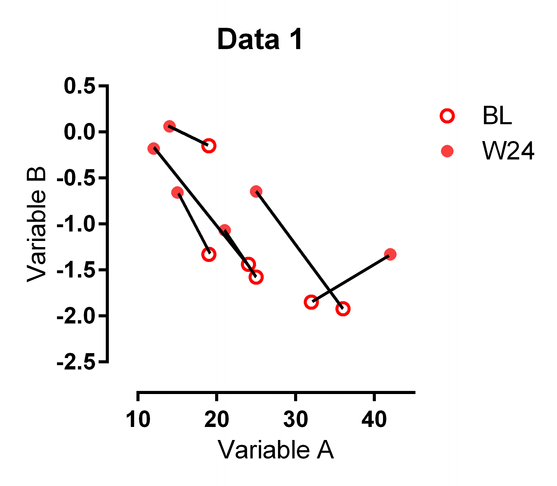
Mock Connected Scatter PlotMock Connected Scatter Plot

Each connecting line connects the Baseline (BL) point to the Week 24 (W24) point for a patient.


The data would be in the folling format
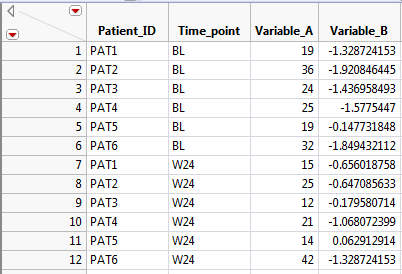
TABLE.PNG

Let me know if you have any ideas: I certainly don't want to draw each connecting line by hand like I did on the mock satter plot above.

Thank you for your help. 


1 ACCEPTED SOLUTION

Accepted Solutions
txnelson
Super User

Re: Is it Possible to Create a Scatter Plot with Pairs of Points Connected in GraphBuilder?

Here is an attempt at what you want.  It is pretty close to what you are requesting. I added a column to your data table which is being used as a Page separator, which I am imagining will be your 1-100 graphs.  Here is the output, followed by the script that generates the sample data table and the graphic output:
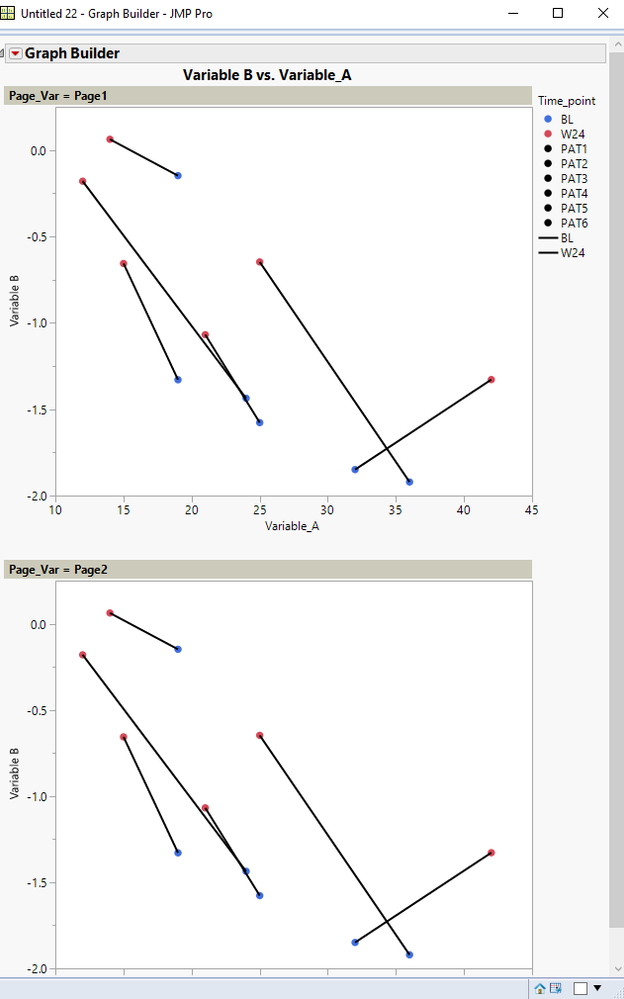
timepoint.PNG

Names Default to here(1);
dt = New Table( "Sample",
	Add Rows( 24 ),
	New Column( "Patient_ID",
		Character,
		"Nominal",
		Set Values(
			{"PAT1", "PAT2", "PAT3", "PAT4", "PAT5", "PAT6", "PAT1", "PAT2", "PAT3",
			"PAT4", "PAT5", "PAT6", "PAT1", "PAT2", "PAT3", "PAT4", "PAT5", "PAT6",
			"PAT1", "PAT2", "PAT3", "PAT4", "PAT5", "PAT6"}
		)
	),
	New Column( "Time_point",
		Character,
		"Nominal",
		Set Selected,
		Set Values(
			{"BL", "BL", "BL", "BL", "BL", "BL", "W24", "W24", "W24", "W24", "W24",
			"W24", "BL", "BL", "BL", "BL", "BL", "BL", "W24", "W24", "W24", "W24",
			"W24", "W24"}
		)
	),
	New Column( "Variable_A",
		Numeric,
		"Continuous",
		Format( "Best", 12 ),
		Set Values(
			[19, 36, 24, 25, 19, 32, 15, 25, 12, 21, 14, 42, 19, 36, 24, 25, 19, 32,
			15, 25, 12, 21, 14, 42]
		)
	),
	New Column( "Variable B",
		Numeric,
		"Continuous",
		Format( "Best", 12 ),
		Set Values(
			[-1.3287, -1.9208, -1.436, -1.577, -0.1477, -1.849, -0.65601, -0.64708,
			-0.17958, -1.06807, 0.06291, -1.328, -1.3287, -1.9208, -1.436, -1.577,
			-0.1477, -1.849, -0.65601, -0.64708, -0.17958, -1.06807, 0.06291, -1.328
			]
		)
	),
	New Column( "Page_Var",
		Character,
		"Nominal",
		Set Values(
			{"Page1", "Page1", "Page1", "Page1", "Page1", "Page1", "Page1", "Page1",
			"Page1", "Page1", "Page1", "Page1", "Page2", "Page2", "Page2", "Page2",
			"Page2", "Page2", "Page2", "Page2", "Page2", "Page2", "Page2", "Page2"}
		)
	)
);

dt << Graph Builder(
	Size( 534, 954 ),
	Show Control Panel( 0 ),
	Variables(
		X( :Variable_A ),
		Y( :Variable B ),
		Page( :Page_Var ),
		Overlay( :Patient_ID ),
		Color( :Time_point )
	),
	Elements( Points( X, Y, Legend( 3 ) ), Line( X, Y, Legend( 5 ) ) ),
	SendToReport(
		Dispatch(
			{},
			"400",
			ScaleBox,
			{Legend Model(
				3,
				Properties( 0, {Marker( "FilledCircle" )} ),
				Properties( 1, {Marker( "FilledCircle" )} ),
				Properties( 2, {Marker( "FilledCircle" )} ),
				Properties( 3, {Marker( "FilledCircle" )} ),
				Properties( 4, {Marker( "FilledCircle" )} ),
				Properties( 5, {Marker( "FilledCircle" )} ),
				Properties( 6, {Marker( "FilledCircle" )} ),
				Properties( 7, {Marker( "FilledCircle" )} )
			), Legend Model(
				5,
				Properties( 0, {Line Color( 0 )} ),
				Properties( 1, {Line Color( 0 )} )
			)}
		),
Dispatch( {}, "Graph Builder", FrameBox, {Marker Size( 5 )} ),
Dispatch( {}, "Graph Builder", FrameBox( 2 ), {Marker Size( 5 )} ) ) );
Jim

View solution in original post

1 REPLY 1
txnelson
Super User

Re: Is it Possible to Create a Scatter Plot with Pairs of Points Connected in GraphBuilder?

Here is an attempt at what you want.  It is pretty close to what you are requesting. I added a column to your data table which is being used as a Page separator, which I am imagining will be your 1-100 graphs.  Here is the output, followed by the script that generates the sample data table and the graphic output:

timepoint.PNG

Names Default to here(1);
dt = New Table( "Sample",
	Add Rows( 24 ),
	New Column( "Patient_ID",
		Character,
		"Nominal",
		Set Values(
			{"PAT1", "PAT2", "PAT3", "PAT4", "PAT5", "PAT6", "PAT1", "PAT2", "PAT3",
			"PAT4", "PAT5", "PAT6", "PAT1", "PAT2", "PAT3", "PAT4", "PAT5", "PAT6",
			"PAT1", "PAT2", "PAT3", "PAT4", "PAT5", "PAT6"}
		)
	),
	New Column( "Time_point",
		Character,
		"Nominal",
		Set Selected,
		Set Values(
			{"BL", "BL", "BL", "BL", "BL", "BL", "W24", "W24", "W24", "W24", "W24",
			"W24", "BL", "BL", "BL", "BL", "BL", "BL", "W24", "W24", "W24", "W24",
			"W24", "W24"}
		)
	),
	New Column( "Variable_A",
		Numeric,
		"Continuous",
		Format( "Best", 12 ),
		Set Values(
			[19, 36, 24, 25, 19, 32, 15, 25, 12, 21, 14, 42, 19, 36, 24, 25, 19, 32,
			15, 25, 12, 21, 14, 42]
		)
	),
	New Column( "Variable B",
		Numeric,
		"Continuous",
		Format( "Best", 12 ),
		Set Values(
			[-1.3287, -1.9208, -1.436, -1.577, -0.1477, -1.849, -0.65601, -0.64708,
			-0.17958, -1.06807, 0.06291, -1.328, -1.3287, -1.9208, -1.436, -1.577,
			-0.1477, -1.849, -0.65601, -0.64708, -0.17958, -1.06807, 0.06291, -1.328
			]
		)
	),
	New Column( "Page_Var",
		Character,
		"Nominal",
		Set Values(
			{"Page1", "Page1", "Page1", "Page1", "Page1", "Page1", "Page1", "Page1",
			"Page1", "Page1", "Page1", "Page1", "Page2", "Page2", "Page2", "Page2",
			"Page2", "Page2", "Page2", "Page2", "Page2", "Page2", "Page2", "Page2"}
		)
	)
);

dt << Graph Builder(
	Size( 534, 954 ),
	Show Control Panel( 0 ),
	Variables(
		X( :Variable_A ),
		Y( :Variable B ),
		Page( :Page_Var ),
		Overlay( :Patient_ID ),
		Color( :Time_point )
	),
	Elements( Points( X, Y, Legend( 3 ) ), Line( X, Y, Legend( 5 ) ) ),
	SendToReport(
		Dispatch(
			{},
			"400",
			ScaleBox,
			{Legend Model(
				3,
				Properties( 0, {Marker( "FilledCircle" )} ),
				Properties( 1, {Marker( "FilledCircle" )} ),
				Properties( 2, {Marker( "FilledCircle" )} ),
				Properties( 3, {Marker( "FilledCircle" )} ),
				Properties( 4, {Marker( "FilledCircle" )} ),
				Properties( 5, {Marker( "FilledCircle" )} ),
				Properties( 6, {Marker( "FilledCircle" )} ),
				Properties( 7, {Marker( "FilledCircle" )} )
			), Legend Model(
				5,
				Properties( 0, {Line Color( 0 )} ),
				Properties( 1, {Line Color( 0 )} )
			)}
		),
Dispatch( {}, "Graph Builder", FrameBox, {Marker Size( 5 )} ),
Dispatch( {}, "Graph Builder", FrameBox( 2 ), {Marker Size( 5 )} ) ) );
Jim

Recommended Articles