- Don’t miss your chance to experience Discovery Summit Europe at our best available rate! Early bird registration through 31 Oct.
- Graph Builder Toolbar streamlines interactive graphing. Creates shortcuts on Report and GraphBuilder Helpers toolbars. Download and install the extension.
- Subscribe to RSS Feed
- Mark Topic as New
- Mark Topic as Read
- Float this Topic for Current User
- Bookmark
- Subscribe
- Mute
- Printer Friendly Page
Discussions
Solve problems, and share tips and tricks with other JMP users.- User Community
- :
- Discussions
- :
- How to interpolate curves

- Mark as New
- Bookmark
- Subscribe
- Mute
- Subscribe to RSS Feed
- Get Direct Link
- Report Inappropriate Content
How to interpolate curves
How to interpolate curve 1 (with sparse points) to match the number of points in curve 2 in order to do further calculations.

- Mark as New
- Bookmark
- Subscribe
- Mute
- Subscribe to RSS Feed
- Get Direct Link
- Report Inappropriate Content
Re: How to interpolate curves
You can use function interpolate(), see formula.
Before applying formula, I splitted data of current into two columns, see table attached.
Interpolate(
	:"Voltage(V)"n,
	:"Voltage(V)"n[Loc Nonmissing( :"Current(A)_1"n << get values )],
	:"Current(A)_1"n[Loc Nonmissing( :"Current(A)_1"n << get values )]
)

- Mark as New
- Bookmark
- Subscribe
- Mute
- Subscribe to RSS Feed
- Get Direct Link
- Report Inappropriate Content
Re: How to interpolate curves
Other option could be using graph builder and getting formula from smoother:
1. Change Curve modeling type to nominal
2. Create smoother graph with Curve as overlay and change settings to fit the lines
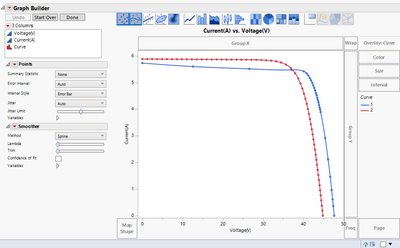
3. Click on the red triangle on Smoother and select Save Formula
4. Now you should have a formula in your data table
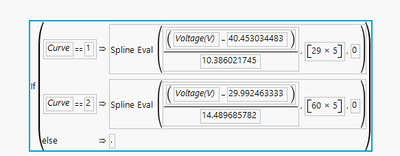
5. With the formula you could then add "missing" voltage values for Curve 1 (add new rows to data) and then create final Current column which would have your original values from Current(A) and then missing values replaced with the Smoother columns values
Edit:
I would also suggest out checking out Fit Y by X platform
Recommended Articles
- © 2026 JMP Statistical Discovery LLC. All Rights Reserved.
- Terms of Use
- Privacy Statement
- Contact Us