- Don’t miss your chance to experience Discovery Summit Europe at our best available rate! Early bird registration through 31 Oct.
- Graph Builder Toolbar streamlines interactive graphing. Creates shortcuts on Report and GraphBuilder Helpers toolbars. Download and install the extension.
- Subscribe to RSS Feed
- Mark Topic as New
- Mark Topic as Read
- Float this Topic for Current User
- Bookmark
- Subscribe
- Mute
- Printer Friendly Page
Discussions
Solve problems, and share tips and tricks with other JMP users.- User Community
- :
- Discussions
- :
- How to display dynamic Data Filter in JMP Live?

- Mark as New
- Bookmark
- Subscribe
- Mute
- Subscribe to RSS Feed
- Get Direct Link
- Report Inappropriate Content
How to display dynamic Data Filter in JMP Live?
We are currently using a custom UI for local setup, but now we want to have a similar setup on JMP Live.
I realized that JMP Live doesn’t work with custom UIs. What options do I have to achieve the same or a similar result?
The current UI filters and creates subsets in a specific format for the end user.
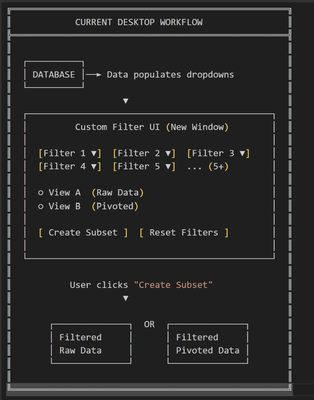
Is it possible, through Data Filter or some other method, to achieve the same functionality on JMP Live? I tested this with Big Class.jmp, but it only uploads and displays the data table on JMP Live, without applying the filtering.
dt = Open("$SAMPLE_DATA/Big Class.jmp");

dt << Data Filter(
Add Filter(columns(:sex, :age))
);


- Mark as New
- Bookmark
- Subscribe
- Mute
- Subscribe to RSS Feed
- Get Direct Link
- Report Inappropriate Content
Re: How to display dynamic Data Filter in JMP Live?
Hey, @OddsDeer284888 ,
For ODBC to work in JMP Live, the ODBC connection needs to use a DSN-less connection. If you publish a data table from JMP that has a source script that uses ODBC, that script will automatically be modified during the publish process to use a DSN-less connection (so it will have driver/server in it rather than a DSN). That's step one. Then, when you make a refresh script for that data table, if you start from the source script, you'll be most of the way there. You will probably have to attach credentials to it.
Step two is to make sure that the ODBC driver that the script uses is installed on the computer that is running the JMP Pool. You may need to talk to your JMP Live administrator about making that happen.
If you run into further problems getting this to work, start a case with JMP Tech Support and we'll make sure to help you get it working.
Good luck,
Eric Hill
- Mark as New
- Bookmark
- Subscribe
- Mute
- Subscribe to RSS Feed
- Get Direct Link
- Report Inappropriate Content
Re: How to display dynamic Data Filter in JMP Live?
Hi,
thank you for your comment.
Did you mean the script that the JMP Live auto generate for the Data Table after we publish the data to JMP Live?

And do you have an example code for the dsn-less query to make connection or test connection for the data refresh?
As with local JMP we are querying it directly like this:
::DB_CONNECTION_STRING = "DSN=testConnection";

    dt_results = Open Database(
        DB_CONNECTION_STRING ,
        "SELECT
            *
        FROM TestTable
        WHERE key IS NOT NULL",
        "Test Table"
    );
What exactly needs to be included in the DSN‑less connection string?
Or should we rely on the auto‑generated refresh script that JMP Live creates during publishing?
- Mark as New
- Bookmark
- Subscribe
- Mute
- Subscribe to RSS Feed
- Get Direct Link
- Report Inappropriate Content
Re: How to display dynamic Data Filter in JMP Live?
Open Database(
	"DSN=testConnection;",
	"SELECT
                *
            FROM TestTable
            WHERE key IS NOT NULL",
	"Test Table"
);
this is the example script that the Source generates.
if we wanted to utilize the above script and use variable instead then the correct format to pass the credentials would be like this? Or is their anythign else needs to be added?
::DB_CONNECTION_STRING =
"DSN=testDSN;" ||  // same name as DSN in the credentials
"UID=%_UID_%;" ||
"PWD=%_PWD_%;";
- Mark as New
- Bookmark
- Subscribe
- Mute
- Subscribe to RSS Feed
- Get Direct Link
- Report Inappropriate Content
Re: How to display dynamic Data Filter in JMP Live?
Hello,
You need to ensure that the server where JMP Live resides has the same exact DSN and Driver installed on it that you have setup on your machine. You'll need to work with your internal JMP Live support team to have them install the driver.
HTH,
Bobby
- Mark as New
- Bookmark
- Subscribe
- Mute
- Subscribe to RSS Feed
- Get Direct Link
- Report Inappropriate Content
Re: How to display dynamic Data Filter in JMP Live?
If the JMP Live server has also the same DSN and Driver installed then is there anything specific needs to be passed in the query to get up-to-date data over there?

- Mark as New
- Bookmark
- Subscribe
- Mute
- Subscribe to RSS Feed
- Get Direct Link
- Report Inappropriate Content
Re: How to display dynamic Data Filter in JMP Live?
You'll need to pass the DB name, driver, port, server and user credentials (as placeholders).
Here's an example script to query data:
dt = New SQL Query(
       Connection(
			"ODBC:DATABASE=placeholder;
			DRIVER={placeholder};
			PORT=placeholder;
			PWD=%_PWD_%;
			SERVER=placeholder;
			UID=%_UID_%;"
       ),
       QueryName( "placeholder" ),
       Select,
       From( Table( "placeholder", Schema( "placeholder" ) ) )
) << Run Foreground;

dt;- « Previous
-
- 1
- 2
- Next »
Recommended Articles
- © 2026 JMP Statistical Discovery LLC. All Rights Reserved.
- Terms of Use
- Privacy Statement
- Contact Us