- Don’t miss your chance to experience Discovery Summit Europe at our best available rate! Early bird registration through 31 Oct.
- Graph Builder Toolbar streamlines interactive graphing. Creates shortcuts on Report and GraphBuilder Helpers toolbars. Download and install the extension.
- Subscribe to RSS Feed
- Mark Topic as New
- Mark Topic as Read
- Float this Topic for Current User
- Bookmark
- Subscribe
- Mute
- Printer Friendly Page
Discussions
Solve problems, and share tips and tricks with other JMP users.- User Community
- :
- Discussions
- :
- How to display dynamic Data Filter in JMP Live?

- Mark as New
- Bookmark
- Subscribe
- Mute
- Subscribe to RSS Feed
- Get Direct Link
- Report Inappropriate Content
How to display dynamic Data Filter in JMP Live?
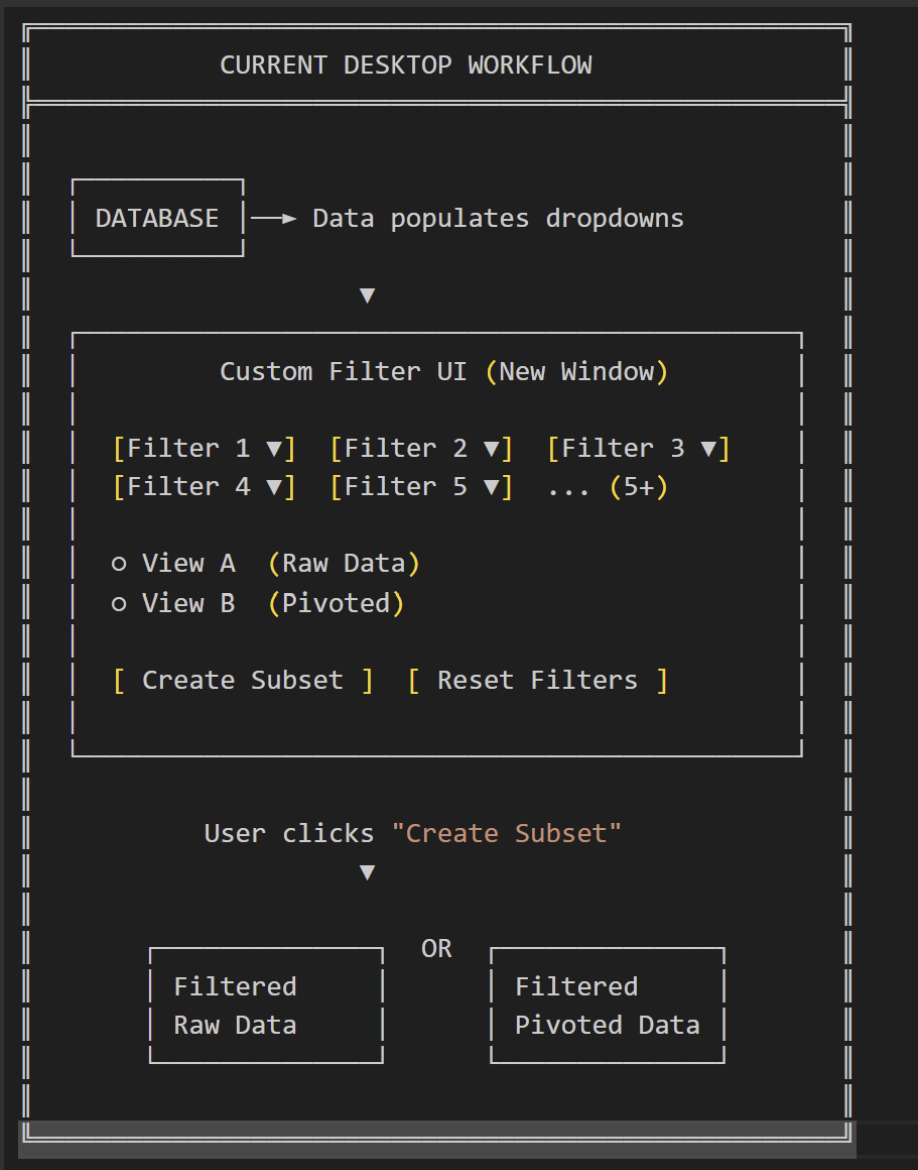
We are currently using a custom UI for local setup, but now we want to have a similar setup on JMP Live.
I realized that JMP Live doesn’t work with custom UIs. What options do I have to achieve the same or a similar result?
The current UI filters and creates subsets in a specific format for the end user.
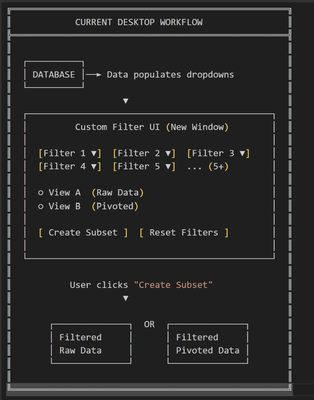
Is it possible, through Data Filter or some other method, to achieve the same functionality on JMP Live? I tested this with Big Class.jmp, but it only uploads and displays the data table on JMP Live, without applying the filtering.
dt = Open("$SAMPLE_DATA/Big Class.jmp");

dt << Data Filter(
Add Filter(columns(:sex, :age))
);
- Mark as New
- Bookmark
- Subscribe
- Mute
- Subscribe to RSS Feed
- Get Direct Link
- Report Inappropriate Content
Re: How to display dynamic Data Filter in JMP Live?
This is our current workflow and UI which we are using internally(locally).
- Mark as New
- Bookmark
- Subscribe
- Mute
- Subscribe to RSS Feed
- Get Direct Link
- Report Inappropriate Content
Re: How to display dynamic Data Filter in JMP Live?

This is our current workflow and UI which we are using internally(locally).


- Mark as New
- Bookmark
- Subscribe
- Mute
- Subscribe to RSS Feed
- Get Direct Link
- Report Inappropriate Content
Re: How to display dynamic Data Filter in JMP Live?
What version of JMP Live are you using? We added the ability to edit the report regeneration script in 19, which allows you to customize your UI more than before. Without seeing it, I am not sure if everything in your custom UI would work automatically when interacting with the data filter.
Here is the docs for editing regeneration scripts: https://www.jmp.com/support/help/en/19.0/jmplive/jmplive.shtml#2667989
- Mark as New
- Bookmark
- Subscribe
- Mute
- Subscribe to RSS Feed
- Get Direct Link
- Report Inappropriate Content
Re: How to display dynamic Data Filter in JMP Live?
I am using the Latest JMP 19.
In my current UI which is not on JMP Live. We have custom conditional dropdowns which we are using as filters and we also have some radio buttons which we are using to decide what kind of subset we wanted to generate.
So filters(dropdowns)+ radio button = Subset Table (In simple words)
The data that we have is more than 50K+.
I tried Data Filter with Tabulate so it is extremely slow on JMP Live. I was wondering what other approaches/solution that I can try to achieve similar thing.
- Mark as New
- Bookmark
- Subscribe
- Mute
- Subscribe to RSS Feed
- Get Direct Link
- Report Inappropriate Content
Re: How to display dynamic Data Filter in JMP Live?
We have had similar requests for something like this in the past. I have updated our internal feature request with your desire.
Unfortunately, the only possible solution I have for you at the moment would be if there were logical separations you could make to the data to split up the reports into multiple reports. You could use the separate reports as different views into the data for a grouping. This may or may not be feasible depending on the complexity of your filters.
- Mark as New
- Bookmark
- Subscribe
- Mute
- Subscribe to RSS Feed
- Get Direct Link
- Report Inappropriate Content
Re: How to display dynamic Data Filter in JMP Live?
Since radio buttons are not possible I am now focusing to have separate reports but still there are issues.
I tried using the Data Filter with Tabulate, but it only works when both are tied to the same data table. If the filter is applied to one table (Table A) and the tabulate is built from another table (Table B), the link breaks — the local data filter doesn’t control the second table.
In JMP Live, I’d like to know if it’s possible to set up a Local Data Filter on Table A, and then have the user’s filter selections automatically drive what is displayed from Table B. For example:
- User filters Table A by Department and Project
- Table B then shows all rows that match those selections, with additional columns such as Result and Date
Right now, this doesn’t seem to work. It feels like JMP Live forces you to use Tabulate, which complicates things, when it would be much simpler if JMP allowed a Data Filter to directly drive filtered data across tables without requiring Tabulate

- Mark as New
- Bookmark
- Subscribe
- Mute
- Subscribe to RSS Feed
- Get Direct Link
- Report Inappropriate Content
Re: How to display dynamic Data Filter in JMP Live?
Can you use Virtual Join to link the two tables together? The example below uses 3 tables that are joined, with customer information linked by the :Customer ID column, and movie information linked by the :Item Number column. The Tabulate uses all 3 tables, summarizing the rental information with filters available on customer demographics.
NamesDefaultToHere(1);
dt_customers = Open( "$SAMPLE_DATA/Movie Customers.jmp", Invisible );
dt_inventory = Open( "$SAMPLE_DATA/Movie Inventory.jmp", Invisible );
dt_rentals = Open( "$SAMPLE_DATA/Movie Rentals.jmp" );
dt_rentals << Tabulate(
	Show Control Panel( 0 ),
	Add Table(
		Column Table(
			Grouping Columns(
				:"Rating[Item Number]"n
			)
		),
		Row Table(
			Grouping Columns(
				:"Genre[Item Number]"n
			)
		)
	),
	Local Data Filter(
		Mode( Show( 0 ) ),
		Add Filter(
			columns(
				:"Gender[Customer ID]"n
			),
			Where(
				:"Gender[Customer ID]"n == "F"
			)
		)
	)
);
- Mark as New
- Bookmark
- Subscribe
- Mute
- Subscribe to RSS Feed
- Get Direct Link
- Report Inappropriate Content
Re: How to display dynamic Data Filter in JMP Live?
The solution from @danschikore will also work in JMP Live.
When refreshing the data via script in JMP Live, make sure to include the virtual join column properties in the script.
Following the example, in the Movie Rentals data script:
:"Customer ID" << Set Property( "Link Reference", Reference Table("Movie Customers.jmp") );
:"Item Number" << Set Property( "Link Reference", Reference Table("Movie Inventory.jmp") );
In the Movie Customers:
:"Customer ID" << Set Property( "Link ID", 1 );An in the Movie Inventory:
:"Item Number" << Set Property( "Link ID", 1 );- Mark as New
- Bookmark
- Subscribe
- Mute
- Subscribe to RSS Feed
- Get Direct Link
- Report Inappropriate Content
Re: How to display dynamic Data Filter in JMP Live?
For the refresh data in JMP Live. How does the ODBC works? Do we need to make some configuration as I am getting the Data source name not found and no default driver specified error. While same script works locally by fetching data from the database.
And for the refresh data the returned data must always be in the data table format to work.
Recommended Articles
- © 2026 JMP Statistical Discovery LLC. All Rights Reserved.
- Terms of Use
- Privacy Statement
- Contact Us