cancel
Showing results for 
Show  only  | Search instead for 
Did you mean: 
  • Learn how to build custom Python data connectors and further customize JMP’s Data Connector Framework with the Python Data Connector Demo, available now in the JMP Marketplace!
  • See how to move from signal modeling to system modeling at the first JMP Aerospace Analytics webinar. Register. June 18, 1 p.m. US Eastern Time.

Discussions

Solve problems, and share tips and tricks with other JMP users.
Choose Language Hide Translation Bar
Setsuna
Level II

Graph builder auto scale fails when using log scale

When using Graph builder, generally, the axis scale (min, max) is set to reasonable values according to the data range.

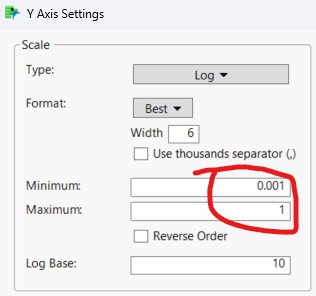
But when I set the scale type to 'Log', the scale range will be set to 1E-3 to 1, while my minimum data point down to 1E-12 level.

This makes the curve outside of the graph window, unless I modify the min/max range manually.

But I'm using JSL to process different of data sources. The data structure/range may be so different, it's hard to define a proper range for all the data source.

So is there any method to make jmp auto scale the axis using JSL?

1 REPLY 1
jthi
Super User

Re: Graph builder auto scale fails when using log scale

How does your script look like? Are you sure that it hasn't been accidentally preconfigured to those values? With JSL you can check from data and estimate what the axis should be.

-Jarmo

Recommended Articles