- Don’t miss your chance to experience Discovery Summit Europe at our best available rate! Early bird registration through 31 Oct.
- Graph Builder Toolbar streamlines interactive graphing. Creates shortcuts on Report and GraphBuilder Helpers toolbars. Download and install the extension.
- Subscribe to RSS Feed
- Mark Topic as New
- Mark Topic as Read
- Float this Topic for Current User
- Bookmark
- Subscribe
- Mute
- Printer Friendly Page
Discussions
Solve problems, and share tips and tricks with other JMP users.- User Community
- :
- Discussions
- :
- Graph Builder: Color not working for multiple Y axes

- Mark as New
- Bookmark
- Subscribe
- Mute
- Subscribe to RSS Feed
- Get Direct Link
- Report Inappropriate Content
Graph Builder: Color not working for multiple Y axes
Hi everyone,
I have columns, lets call them X, Y1, Y2, and C. Column C has value colors defined.
When I open a new graph builder and drag X on the x axis, Y1 on the y axis and C on color, the dots in the plot show with the right color defined by the value colors of column C.
But when I drag Y2 and drop it on the y axis below Y1 so that I get two graphs, both show with a different coloring than what I defined in the value colors of column C.
When I then drag the column C from color to overlay, the colors show correct again for both graphs.
Why are the color values ignored for column C in "color" for multiple y axes? Is it a bug? I'm using JMP 17.0.0.
Cheers
Rob
Accepted Solutions


- Mark as New
- Bookmark
- Subscribe
- Mute
- Subscribe to RSS Feed
- Get Direct Link
- Report Inappropriate Content
Re: Graph Builder: Color not working for multiple Y axes
Most likely a bug, happens also with JMP17.2.0. Seems to work a bit weirdly, you can add both color and overlay with same column and then disable/enable it from variables
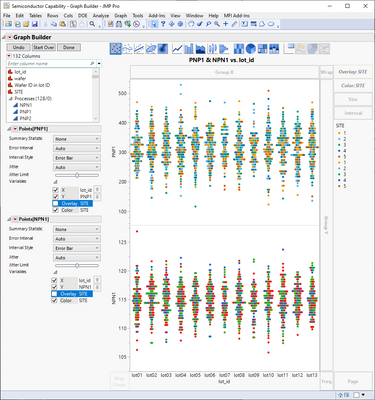
If your scales for the Y1 and Y2 are similar, you could stack the data and plot it that way (as a workaround).
- Mark as New
- Bookmark
- Subscribe
- Mute
- Subscribe to RSS Feed
- Get Direct Link
- Report Inappropriate Content
Re: Graph Builder: Color not working for multiple Y axes
Most likely a bug, happens also with JMP17.2.0. Seems to work a bit weirdly, you can add both color and overlay with same column and then disable/enable it from variables
If your scales for the Y1 and Y2 are similar, you could stack the data and plot it that way (as a workaround).

- Mark as New
- Bookmark
- Subscribe
- Mute
- Subscribe to RSS Feed
- Get Direct Link
- Report Inappropriate Content
Re: Graph Builder: Color not working for multiple Y axes
Will be fixed in Jmp18:
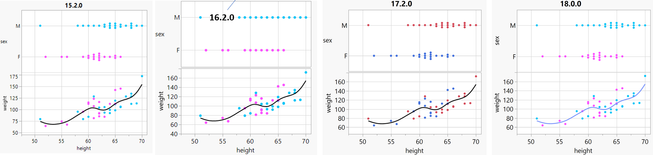
generate via:
Names Default to Here(1);
dt = Open( "$SAMPLE_DATA/Big Class.jmp" );
mytitle=Jmp version();
:sex << Set Property(
	"Value Colors",
	{"F" = 43, "M" = 45}
);
dt << Graph Builder(
	Size( 390, 386 ),
	Show Control Panel( 0 ),
	Variables( X( :height ), Y( :sex ), Y( :weight ), Color( :sex ) ),
	Elements( Position( 1, 1 ), Points( X, Y, Legend( 12 ) ) ),
	Elements(
		Position( 1, 2 ),
		Points( X, Y, Legend( 13 ) ),
		Smoother( X, Y, Legend( 14 ) )
	),
	SendToReport(
		Dispatch( {}, "graph title", TextEditBox, {Set Text( mytitle )} )
	)
)
Recommended Articles
- © 2026 JMP Statistical Discovery LLC. All Rights Reserved.
- Terms of Use
- Privacy Statement
- Contact Us