- Don’t miss your chance to experience Discovery Summit Europe at our best available rate! Early bird registration through 31 Oct.
- Graph Builder Toolbar streamlines interactive graphing. Creates shortcuts on Report and GraphBuilder Helpers toolbars. Download and install the extension.
- Subscribe to RSS Feed
- Mark Topic as New
- Mark Topic as Read
- Float this Topic for Current User
- Bookmark
- Subscribe
- Mute
- Printer Friendly Page
Discussions
Solve problems, and share tips and tricks with other JMP users.- User Community
- :
- Discussions
- :
- Exporting full LCA dataset to CSV/Excel

- Mark as New
- Bookmark
- Subscribe
- Mute
- Subscribe to RSS Feed
- Get Direct Link
- Report Inappropriate Content
Exporting full LCA dataset to CSV/Excel
I conducted an LCA analysis on survey questions. In the "parameter estimates" section of the generated report, there is a table. When I export it, it doesn't export the merged cells on top. For example:
Cluster 1: [Top Column: State]
[AZ] [VA], [DC], [TX]
It only exports the cluster, and the parameter estimates for [AZ] [VA], [DC], [TX]. I want to export every visible thing, including the top column with merged cells.


- Mark as New
- Bookmark
- Subscribe
- Mute
- Subscribe to RSS Feed
- Get Direct Link
- Report Inappropriate Content
Re: Exporting full LCA dataset to CSV/Excel
I hope someone in the Community has a better solution than what I have come up with. I am not aware of a direct way to add the spanning headers to the column headers in an output data table. However I have written an example script that can do what you want.
It takes an LCA analysis output
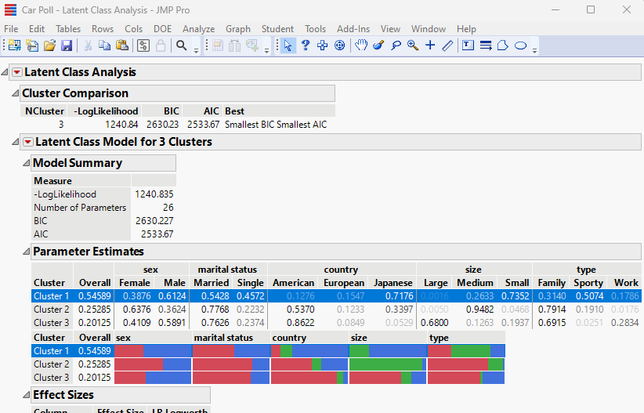
and output the Parameter Estimates table with the Spanning Headers prefixed to each column

Here is the example script
Names Default To Here( 1 );

// Run a LCA
dt = Open( "$SAMPLE_DATA/Car Poll.jmp" );
dt << Latent Class Analysis(
	Y( :sex, :marital status, :country, :size, :type ),
	Set Random Seed( 12345 ),
	Number of Clusters( 3 ),
);

// Create an output table will all header names in each column's name
obj = current report()[OutlineBox(1)];
// Get the number of tiles that span across columns
numSpans = Length( (obj  << xpath( "//ColSpanBox" )) );

// Loop across the spanning titles and add the title as a prefix to the column name
For( span = 1, span <= numSpans, span++,
	// Get the header
	theHeading = obj["Parameter Estimates"][Col Span Box( span )] << get heading;
	// Get the column names for the current spanning header
	theCols = obj["Parameter Estimates"][Col Span Box( span )] << get text;
	// Loop across each column name in the span
	subColNum = 1;
	While( Try( Word( subColNum, theCols, "\!n\!t\!r" ), "" ) != "",
		targetCol = Word( subColNum, theCols, "\!n\!t\!r" );
		// Loop across all numeric column and when a match is found change the column name
		numCol = 2;
		While(
			Try( obj["Parameter Estimates"][Number Col Box( numCol )] << get heading, "" )
			 != "",
			theNumberColBoxHeader = obj["Parameter Estimates"][Number Col Box( numCol )]
			 << get heading;
			If( targetCol == theNumberColBoxHeader,
				obj["Parameter Estimates"][Number Col Box( numCol )] <<
				set heading( theHeading || " " || targetCol )
			);
			numCol++;
		);
		subColNum++;
	);
);

// Create the output data table
obj["Parameter Estimates", Table Box( 1 )] << Make into data table;
- Mark as New
- Bookmark
- Subscribe
- Mute
- Subscribe to RSS Feed
- Get Direct Link
- Report Inappropriate Content
Re: Exporting full LCA dataset to CSV/Excel
That is impressive @txnelson you have no idea how much time you have helped me save. Kudos to you, sir!
Recommended Articles
- © 2026 JMP Statistical Discovery LLC. All Rights Reserved.
- Terms of Use
- Privacy Statement
- Contact Us