- Don’t miss your chance to experience Discovery Summit Europe at our best available rate! Early bird registration through 31 Oct.
- Graph Builder Toolbar streamlines interactive graphing. Creates shortcuts on Report and GraphBuilder Helpers toolbars. Download and install the extension.
- Subscribe to RSS Feed
- Mark Topic as New
- Mark Topic as Read
- Float this Topic for Current User
- Bookmark
- Subscribe
- Mute
- Printer Friendly Page
Discussions
Solve problems, and share tips and tricks with other JMP users.- User Community
- :
- Discussions
- :
- Re: Disappearance of confidence intervals on profiler

- Mark as New
- Bookmark
- Subscribe
- Mute
- Subscribe to RSS Feed
- Get Direct Link
- Report Inappropriate Content
Disappearance of confidence intervals on profiler
Good afternoon (from East Coast) JMP staffs and users!
I have three questions on using JMP software.
1. I built a customized response surface model with triplicates in the central point.
When I open the 'Profiler' from 'Fit model', it shows confidence intervals as shown below.
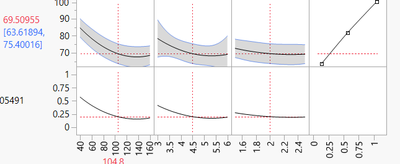
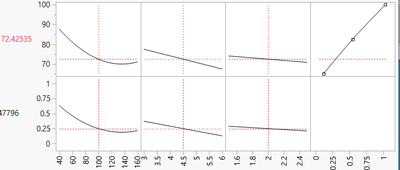
However, when I open this fitted model through 'Profiler' under 'Graph' tab, it does not show confidence intervals.
I also do not show CI in 'Actual by Predicted Plot'.
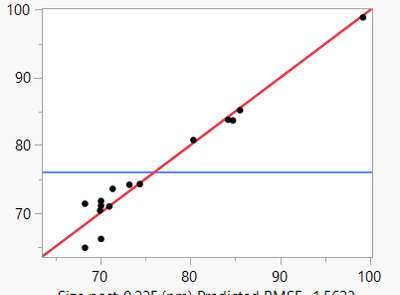
Do you know what might have caused this and how to fix this issue?
2. When you simulate the variables and responses, does it account for confidence intervals of response?
3. Is it possible to simulate the variables based on fixed value of response rather than the response based on maximizing the desirability?
Any answers or pointing me to relevant post would be appreciated.
Thank you!
Best,
Bumjun
- Mark as New
- Bookmark
- Subscribe
- Mute
- Subscribe to RSS Feed
- Get Direct Link
- Report Inappropriate Content
Re: Disappearance of confidence intervals on profiler
Thank you @Dan_Obermiller ,
It finally worked after changing the ID on PredSE identical to Pred Formula.
Do you consider it as a bug? There will be incidences that people recreate/modify error column.


- Mark as New
- Bookmark
- Subscribe
- Mute
- Subscribe to RSS Feed
- Get Direct Link
- Report Inappropriate Content
Re: Disappearance of confidence intervals on profiler
No, this is certainly not a bug. As my last sentence stated, by using this ID, JMP allows you to plot multiple prediction formulas with their corresponding confidence intervals on the same profiler. Think of the situation with Y1 and Y2, with the corresponding StdErr Y1 and StdErr Y2. If I wanted both Y1 and Y2 on the profiler with their confidence intervals, the software could easily get the confidence intervals mixed up. The ID code will prevent that from happening.
Further, the prediction formula and the PredSE Formula are typically saved in the same modeling session as @Ressel stated. If you save them in separate sessions (which would lead to different ID numbers), you run the risk of the models not being exactly the same. That means that the confidence intervals would not be correct for the model that you are displaying. The approach that is used by JMP helps to ensure accuracy.

- Mark as New
- Bookmark
- Subscribe
- Mute
- Subscribe to RSS Feed
- Get Direct Link
- Report Inappropriate Content
Re: Disappearance of confidence intervals on profiler
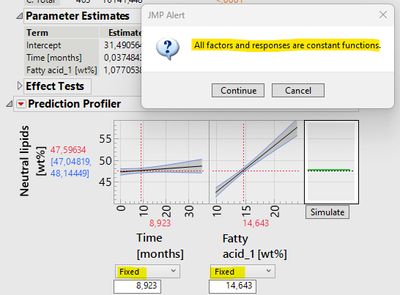
Regarding your question #2: I am not a statistician, but (intuitively) I'd be surprised if the confidence interval played a big role in your simulation. Your simulated response depends on how the variability of the input variables is set. If input variables are provided as "fixed", the response doesn't vary because the input variables are not drawn from a distribution. You can see this in the screenshot below. I've set both input variables to "Fixed", which results in no variation of the response (or, in other words, a constant response) plus the JMP Alert notifying that "all factors and responses are constant functions. Therefore, I would answer a loud and clear "No" to your question #2.
- Mark as New
- Bookmark
- Subscribe
- Mute
- Subscribe to RSS Feed
- Get Direct Link
- Report Inappropriate Content
Re: Disappearance of confidence intervals on profiler
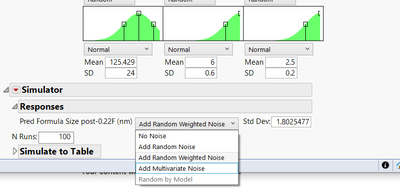
In the simulator, below the profiler there is a spot labeled Responses. In there is a weight field where you can enter the noise to add to the response. Change that to be Random by Model and will add your model error to the simulated value. This will give you noise due to the input variables changing + the noise of the response itself.
- Mark as New
- Bookmark
- Subscribe
- Mute
- Subscribe to RSS Feed
- Get Direct Link
- Report Inappropriate Content
Re: Disappearance of confidence intervals on profiler
For accounting for noise of input variables, I see this Random by Model is greyed out.
Do you also have troubleshoot for this?

- Mark as New
- Bookmark
- Subscribe
- Mute
- Subscribe to RSS Feed
- Get Direct Link
- Report Inappropriate Content
Re: Disappearance of confidence intervals on profiler
Maybe. The model error comes from the Root Mean Square Error (RMSE) of the model. So in that model fitting window go to the red triangle for the model and choose Regression Reports > Summary of Fit. Is there a non-zero number in the RMSE field? Also, that menu choice is only available from the Fit Model platform. I don't believe you get that option from the Graph > Profiler option because that is not a model fitting platform.
- Mark as New
- Bookmark
- Subscribe
- Mute
- Subscribe to RSS Feed
- Get Direct Link
- Report Inappropriate Content
Re: Disappearance of confidence intervals on profiler
Thank you @Dan_Obermiller
Indeed, this option is available only in Fit Model platform.
Thank you for your help again!
- Mark as New
- Bookmark
- Subscribe
- Mute
- Subscribe to RSS Feed
- Get Direct Link
- Report Inappropriate Content
Re: Disappearance of confidence intervals on profiler
Regarding your question #3: If you have a model for a given response, why (and how?) would you fix it to simulate the variability of the input variables? If you are interested in the variability of your input variables I suggest
- getting experimental data to estimate variability of the input variables
- fit a separate model to making what is an input variable in one model a response variable in another model for estimating variability
Again, not a statistician, but simulating the input variables using a fixed response goes contrary to how I understand model fitting.
- « Previous
-
- 1
- 2
- Next »
Recommended Articles
- © 2026 JMP Statistical Discovery LLC. All Rights Reserved.
- Terms of Use
- Privacy Statement
- Contact Us