- Discovery Summit 2026: Early User Edition - September 23-24.Register. It's free.
- Graph Builder Toolbar streamlines interactive graphing. Creates shortcuts on Report and GraphBuilder Helpers toolbars. Download and install the extension.
- Subscribe to RSS Feed
- Mark Topic as New
- Mark Topic as Read
- Float this Topic for Current User
- Bookmark
- Subscribe
- Mute
- Printer Friendly Page
Discussions
Solve problems, and share tips and tricks with other JMP users.- User Community
- :
- Discussions
- :
- Re: Data transformations

- Mark as New
- Bookmark
- Subscribe
- Mute
- Subscribe to RSS Feed
- Get Direct Link
- Report Inappropriate Content
Data transformations
Hello!
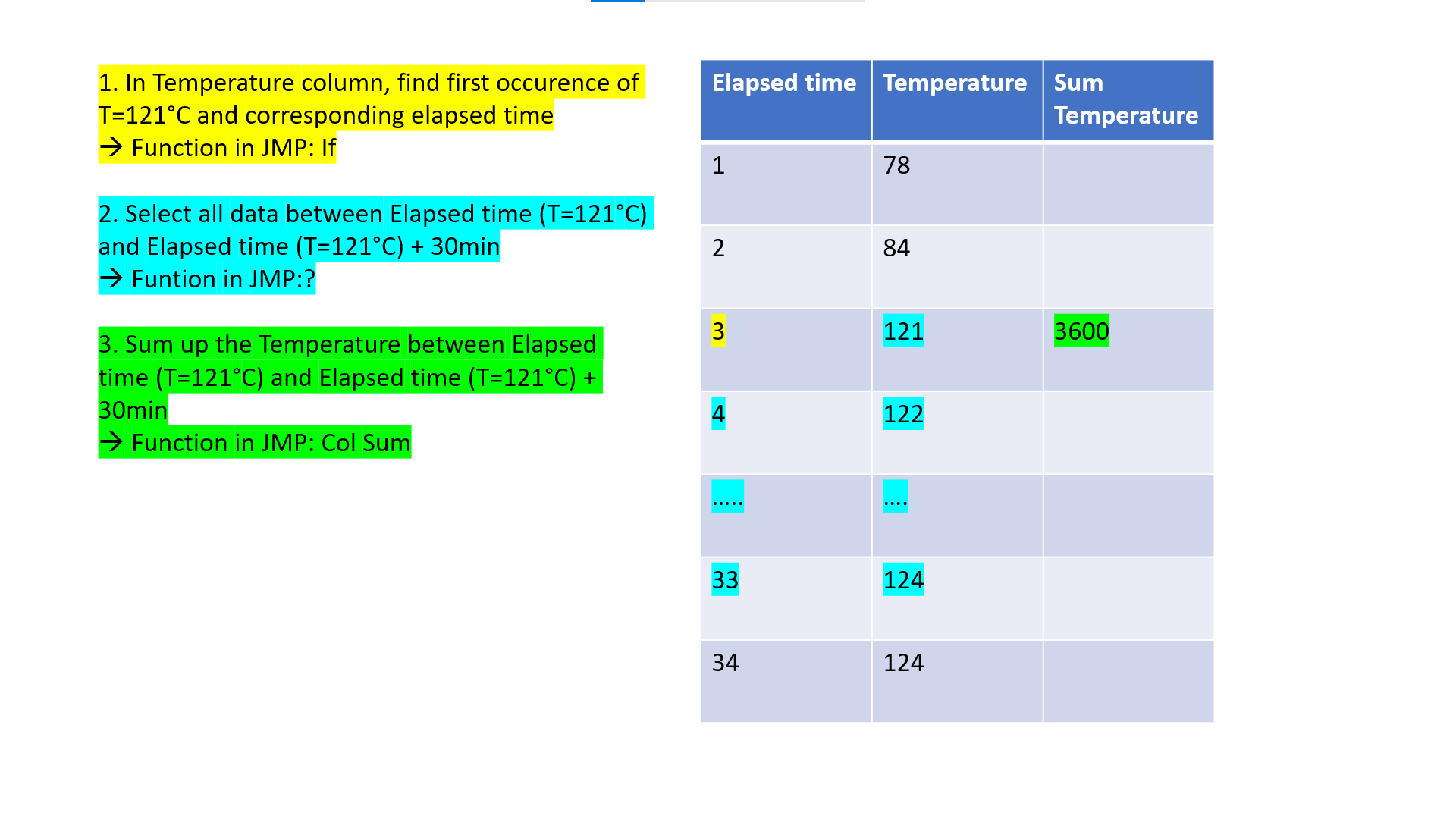
I have the following task (see attachment).
I am struggling in particular with step nb 2. Would you know how to tackle this?
Thank you in advance for your support!
Best regards,
Claire
Accepted Solutions


- Mark as New
- Bookmark
- Subscribe
- Mute
- Subscribe to RSS Feed
- Get Direct Link
- Report Inappropriate Content
Re: Data transformations
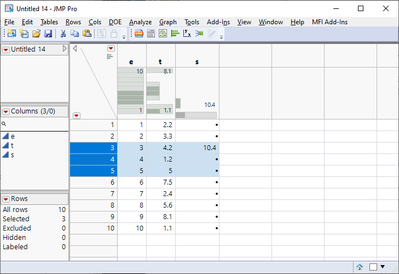
I would most likely use matrix calculations
Names Default To Here(1);

dt = New Table("Untitled 14",
	Add Rows(10),
	Compress File When Saved(1),
	New Column("e",
		Numeric,
		"Continuous",
		Format("Best", 12),
		Set Values([1, 2, 3, 4, 5, 6, 7, 8, 9, 10])
	),
	New Column("t",
		Numeric,
		"Continuous",
		Format("Best", 12),
		Set Values([2.2, 3.3, 4.2, 1.2, 5, 7.5, 2.4, 5.6, 8.1, 1.1])
	)
);

dt << New Column("s", Numeric, Continuous, << Set Each Value(
	As Constant(
		es = :e << get values;
		ts = :t << get values;
		f_row = Min(Loc(ts, 4.2));
		t_idx = Index(f_row, f_row + 2);
		s = Sum(ts[t_idx]);
	);
	If(row() == f_row,
		s,
	,
		.
	);
));

- Mark as New
- Bookmark
- Subscribe
- Mute
- Subscribe to RSS Feed
- Get Direct Link
- Report Inappropriate Content
Re: Data transformations
use excel, countA and countif functions
- Mark as New
- Bookmark
- Subscribe
- Mute
- Subscribe to RSS Feed
- Get Direct Link
- Report Inappropriate Content
Re: Data transformations
I would most likely use matrix calculations
Names Default To Here(1);

dt = New Table("Untitled 14",
	Add Rows(10),
	Compress File When Saved(1),
	New Column("e",
		Numeric,
		"Continuous",
		Format("Best", 12),
		Set Values([1, 2, 3, 4, 5, 6, 7, 8, 9, 10])
	),
	New Column("t",
		Numeric,
		"Continuous",
		Format("Best", 12),
		Set Values([2.2, 3.3, 4.2, 1.2, 5, 7.5, 2.4, 5.6, 8.1, 1.1])
	)
);

dt << New Column("s", Numeric, Continuous, << Set Each Value(
	As Constant(
		es = :e << get values;
		ts = :t << get values;
		f_row = Min(Loc(ts, 4.2));
		t_idx = Index(f_row, f_row + 2);
		s = Sum(ts[t_idx]);
	);
	If(row() == f_row,
		s,
	,
		.
	);
));
- Mark as New
- Bookmark
- Subscribe
- Mute
- Subscribe to RSS Feed
- Get Direct Link
- Report Inappropriate Content
Re: Data transformations
thank you! I will try applying this now to my actual table and see if it works for me.
- Mark as New
- Bookmark
- Subscribe
- Mute
- Subscribe to RSS Feed
- Get Direct Link
- Report Inappropriate Content
Re: Data transformations
Thank you! My script is now working in my actual datatable (see script below).
I have an additional inquiry! In the same datatable I have 6 data subsets (differentiated by Column X where subsets are differentiated as "a", "b", "c", "d", "e" and "f").
How could I apply this script to all 6 subsets and get the 6 results in the same column?
Best
Claire
__________________________________________
Script:
dt = Current Data Table();
dt << New Column("sumtempj", Numeric, Continuous, << Set Each Value(
As Constant(
ts = :"Rounded TempJ" << get values;
f_row = Min(Loc(ts,121));
t_idx = Index(f_row, f_row + 359);
sumtempj = Sum(ts[t_idx])-(360*121);
);
If(row() == f_row,
sumtempj,
,
.
);
)
);
Recommended Articles
- © 2026 JMP Statistical Discovery LLC. All Rights Reserved.
- Terms of Use
- Privacy Statement
- Contact Us