- Don’t miss your chance to experience Discovery Summit Europe at our best available rate! Early bird registration through 31 Oct.
- Graph Builder Toolbar streamlines interactive graphing. Creates shortcuts on Report and GraphBuilder Helpers toolbars. Download and install the extension.
- Subscribe to RSS Feed
- Mark Topic as New
- Mark Topic as Read
- Float this Topic for Current User
- Bookmark
- Subscribe
- Mute
- Printer Friendly Page
Discussions
Solve problems, and share tips and tricks with other JMP users.- User Community
- :
- Discussions
- :
- Can I modify "Remembered settings" in a table and re-import them into the profil...

- Mark as New
- Bookmark
- Subscribe
- Mute
- Subscribe to RSS Feed
- Get Direct Link
- Report Inappropriate Content
Can I modify "Remembered settings" in a table and re-import them into the profiler?
Hi JMP community,
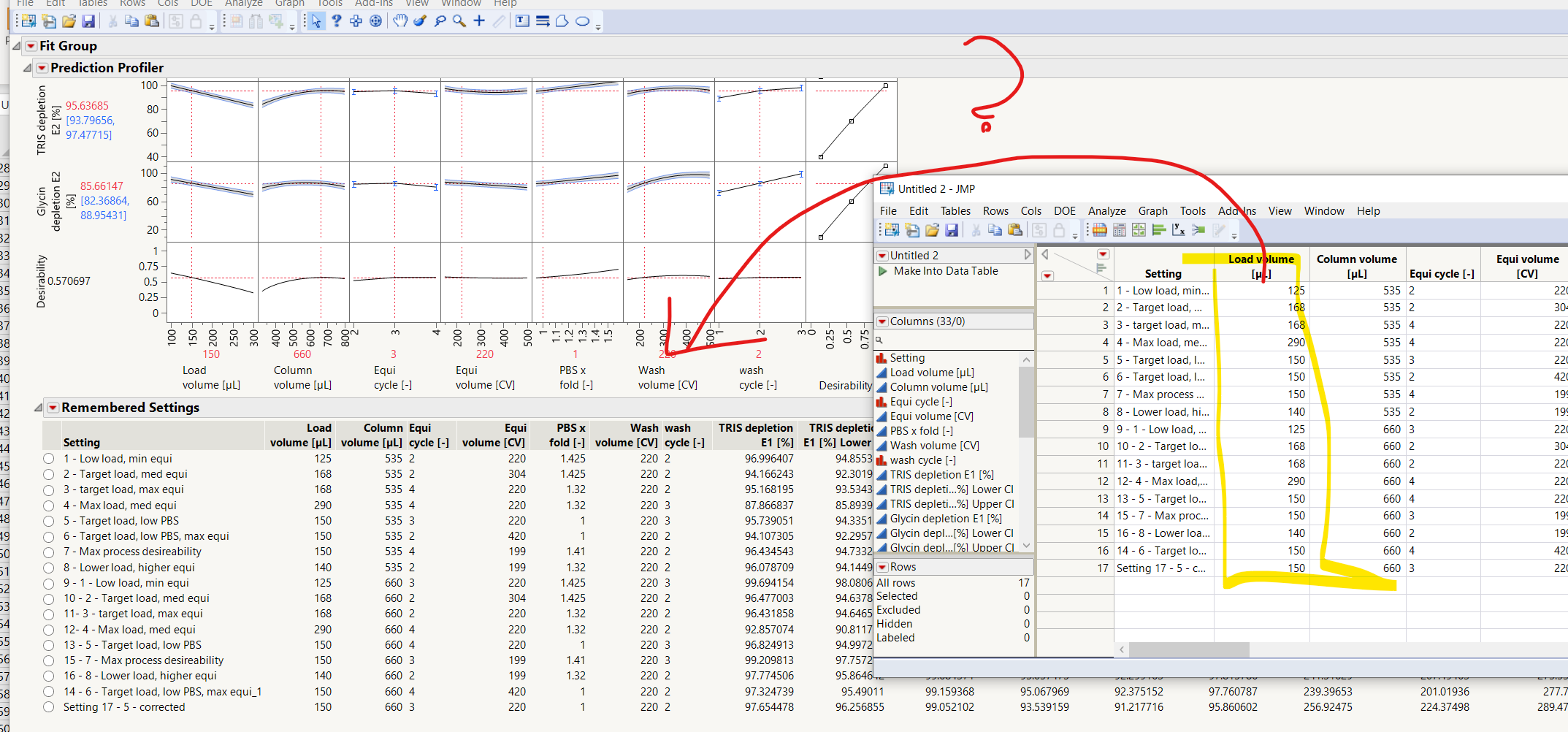
I would like to modify and run different settings of the prediction profiler in a more efficient way.
Modifying each single entry by hand is tedious.
Can I modify the settings in an exported table and re-impiort them into the profiler to predict the new settings?
I am alos open to other suggestions.
cheers
ben
Accepted Solutions


- Mark as New
- Bookmark
- Subscribe
- Mute
- Subscribe to RSS Feed
- Get Direct Link
- Report Inappropriate Content
Re: Can I modify "Remembered settings" in a table and re-import them into the profiler?
Hi @BenGengenbach ,
It seems that you need to use script to do what you want.
Here is a sample script. I hope it works for you.
1. Run fit model
2. Open factor setting table you want to apply
3. Open script file and run script
rpt = Current Report();
obj = rpt << XPath( "//OutlineBox[@helpKey='Profiler']" );
profiler = obj[1] << get scriptable object;
current_setting_values = profiler << Get Factor Settings;

//Select data table
dtNames = {};
For( t = 1, t <= N Table(), t++,
	Insert Into( dtNames, Data Table( t ) << getName )
);
nw2 = New Window( "Data table selector",
	<<modal(),
	<<Return Result,
	H List Box(
		Panel Box( "Pick a data table",
			dlg_dtlb = List Box( dtNames, width( 280 ), nlines( 5 ), MaxItems( 1 ) ),
		)
	)
);

//Set the factor values and remember
setting_tb = Data Table( nw2["dlg_dtlb"][1] );
new_settings_list = {};
fac_name_list = {};
new_settings_script = "";

For( s = 1, s <= N Items( current_setting_values ), s++,
	isstring1 = Is Missing( Min( setting_tb[0, 1 + s] ) );
	isstring2 = Is Missing( Min( Num( setting_tb[0, 1 + s][1] ) ) );
	If( isstring1,
		Insert Into( new_settings_list, Eval List( {setting_tb[0, 1 + s]} ) ),
		Insert Into( new_settings_list, setting_tb[0, 1 + s] );

	);
	If( isstring2,
		new_settings_script = new_settings_script || Regex(
			Char( current_setting_values[s] ),
			"(.*?) = (.*?)",
			"\1"
		) || "( \!"_val_" || Char( s ) || "\!", Lock(0), Show(1)),"
	,
		new_settings_script = new_settings_script || Regex(
			Char( current_setting_values[s] ),
			"(.*?) = (.*?)",
			"\1"
		) || "( _val_" || Char( s ) || ", Lock(0), Show(1)),"
	)
	;
);

new_settings_script = "profiler << Term Value(" || new_settings_script || ")";
For( i = 1, i <= N Row( setting_tb ), i++,
	script = new_settings_script;
	For( f = 1, f <= N Items( current_setting_values ), f++,
		Substitute Into( script, "_val_" || Char( f ), Char( new_settings_list[f][i] ) )
	);
	Try(
		Eval( Parse( script ) );
		profiler << Remember Settings;
	);
);

//Set Setting name to the report
jmp_version = JMP Version();
jmp_version_num = Num( Left( jmp_version, Contains( jmp_version, "." ) - 1 ) );

if(jmp_version_num >= 17,
s_stringcolbox = obj[1][Outline Box( 2 )][Table Box( 1 )][String Col Edit Box( 1 )];,
s_stringcolbox = obj[1][Outline Box( 2 )][Table Box( 1 )][String Col Box( 1 )];
);
setting_name = s_stringcolbox << get();
new_settings_name = setting_tb[0, 1];
m = N Items( setting_name ) - N Items( new_settings_name ) + 1;
n = N Items( new_settings_name );
j = 1;
For( i = m, i <= N Items( setting_name ), i++,
	setting_name[i] = new_settings_name[j];
	j = j + 1;
);
s_stringcolbox << set values( setting_name );
Unfortunately, I could not find a way to delete the current settings with a script, so you have to do it manually.
- Mark as New
- Bookmark
- Subscribe
- Mute
- Subscribe to RSS Feed
- Get Direct Link
- Report Inappropriate Content
Re: Can I modify "Remembered settings" in a table and re-import them into the profiler?
Hi @BenGengenbach ,
It seems that you need to use script to do what you want.
Here is a sample script. I hope it works for you.
1. Run fit model
2. Open factor setting table you want to apply
3. Open script file and run script
rpt = Current Report();
obj = rpt << XPath( "//OutlineBox[@helpKey='Profiler']" );
profiler = obj[1] << get scriptable object;
current_setting_values = profiler << Get Factor Settings;

//Select data table
dtNames = {};
For( t = 1, t <= N Table(), t++,
	Insert Into( dtNames, Data Table( t ) << getName )
);
nw2 = New Window( "Data table selector",
	<<modal(),
	<<Return Result,
	H List Box(
		Panel Box( "Pick a data table",
			dlg_dtlb = List Box( dtNames, width( 280 ), nlines( 5 ), MaxItems( 1 ) ),
		)
	)
);

//Set the factor values and remember
setting_tb = Data Table( nw2["dlg_dtlb"][1] );
new_settings_list = {};
fac_name_list = {};
new_settings_script = "";

For( s = 1, s <= N Items( current_setting_values ), s++,
	isstring1 = Is Missing( Min( setting_tb[0, 1 + s] ) );
	isstring2 = Is Missing( Min( Num( setting_tb[0, 1 + s][1] ) ) );
	If( isstring1,
		Insert Into( new_settings_list, Eval List( {setting_tb[0, 1 + s]} ) ),
		Insert Into( new_settings_list, setting_tb[0, 1 + s] );

	);
	If( isstring2,
		new_settings_script = new_settings_script || Regex(
			Char( current_setting_values[s] ),
			"(.*?) = (.*?)",
			"\1"
		) || "( \!"_val_" || Char( s ) || "\!", Lock(0), Show(1)),"
	,
		new_settings_script = new_settings_script || Regex(
			Char( current_setting_values[s] ),
			"(.*?) = (.*?)",
			"\1"
		) || "( _val_" || Char( s ) || ", Lock(0), Show(1)),"
	)
	;
);

new_settings_script = "profiler << Term Value(" || new_settings_script || ")";
For( i = 1, i <= N Row( setting_tb ), i++,
	script = new_settings_script;
	For( f = 1, f <= N Items( current_setting_values ), f++,
		Substitute Into( script, "_val_" || Char( f ), Char( new_settings_list[f][i] ) )
	);
	Try(
		Eval( Parse( script ) );
		profiler << Remember Settings;
	);
);

//Set Setting name to the report
jmp_version = JMP Version();
jmp_version_num = Num( Left( jmp_version, Contains( jmp_version, "." ) - 1 ) );

if(jmp_version_num >= 17,
s_stringcolbox = obj[1][Outline Box( 2 )][Table Box( 1 )][String Col Edit Box( 1 )];,
s_stringcolbox = obj[1][Outline Box( 2 )][Table Box( 1 )][String Col Box( 1 )];
);
setting_name = s_stringcolbox << get();
new_settings_name = setting_tb[0, 1];
m = N Items( setting_name ) - N Items( new_settings_name ) + 1;
n = N Items( new_settings_name );
j = 1;
For( i = m, i <= N Items( setting_name ), i++,
	setting_name[i] = new_settings_name[j];
	j = j + 1;
);
s_stringcolbox << set values( setting_name );
Unfortunately, I could not find a way to delete the current settings with a script, so you have to do it manually.
- Mark as New
- Bookmark
- Subscribe
- Mute
- Subscribe to RSS Feed
- Get Direct Link
- Report Inappropriate Content
Re: Can I modify "Remembered settings" in a table and re-import them into the profiler?
Hi @yuichi_katsumur ,
wow, thank you for your effort, that is awesome and works nicely!
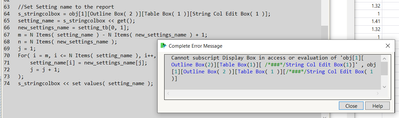
One minor thing: The settings are correctly loaded into the model however I get this error.
Cannot subscript Display Box in access or evaluation of 'obj[1][Outline Box(2)][Table Box(1)][ /*###*/String Col Edit Box(1)]' , obj[1][Outline Box( 2 )][Table Box( 1 )][/*###*/String Col Edit Box( 1 )]
I am not familiar with JSL so maybe you can help me out here ;)
cheers ben
- Mark as New
- Bookmark
- Subscribe
- Mute
- Subscribe to RSS Feed
- Get Direct Link
- Report Inappropriate Content
Re: Can I modify "Remembered settings" in a table and re-import them into the profiler?
Hello @BenGengenbach ,
Thank you for your reply. I have modified my jsl so that the error does not occur. Please see my jsl in the previous reply.
- Mark as New
- Bookmark
- Subscribe
- Mute
- Subscribe to RSS Feed
- Get Direct Link
- Report Inappropriate Content
Re: Can I modify "Remembered settings" in a table and re-import them into the profiler?
Works like a charm!
Recommended Articles
- © 2026 JMP Statistical Discovery LLC. All Rights Reserved.
- Terms of Use
- Privacy Statement
- Contact Us