- Don’t miss your chance to experience Discovery Summit Europe at our best available rate! Early bird registration through 31 Oct.
- Graph Builder Toolbar streamlines interactive graphing. Creates shortcuts on Report and GraphBuilder Helpers toolbars. Download and install the extension.
- Subscribe to RSS Feed
- Mark Topic as New
- Mark Topic as Read
- Float this Topic for Current User
- Bookmark
- Subscribe
- Mute
- Printer Friendly Page
Discussions
Solve problems, and share tips and tricks with other JMP users.- User Community
- :
- Discussions
- :
- Re: Blue line of logworth: how to change?

- Mark as New
- Bookmark
- Subscribe
- Mute
- Subscribe to RSS Feed
- Get Direct Link
- Report Inappropriate Content
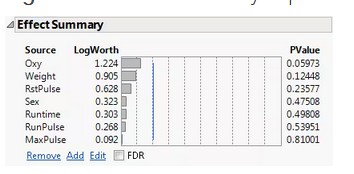
Blue line of logworth: how to change?
How do I change the logworth value to alpha 0.07? I would like the logworth effect summary line to be calculated for the alpha value I want.
Accepted Solutions


- Mark as New
- Bookmark
- Subscribe
- Mute
- Subscribe to RSS Feed
- Get Direct Link
- Report Inappropriate Content
Re: Blue line of logworth: how to change?
This example demonstrates a more direct way to change the reference line for the LogWorth criterion:
// calculate logworth criterion
alpha = 0.07;
criterion = -Log10( alpha_level );

// add reference line for criterion
rpt = Current Report();
rpt["Effect Summary"][PlotColBox(1)] << Set Reference Line( criterion );
- Mark as New
- Bookmark
- Subscribe
- Mute
- Subscribe to RSS Feed
- Get Direct Link
- Report Inappropriate Content
Re: Blue line of logworth: how to change?
Hi @ivanpicchi ,
It seems that there is no GUI to change the blue line of logworth. You have to use a script to change the line.
Here is an example.
//Calculate logworth from alpha
alpha_level = 0.07;
logworth_values = -Log10( alpha_level );

//Get a reference for the report
rpt = Current Report();
value_matrix = rpt[Outline Box( "Effect Summary" )][Plot Col Box( 1 )] << get as matrix;
count_n = N Row( value_matrix );
line_value = J( count_n, 1, logworth_values );
//Change the line
rpt[Outline Box( "Effect Summary" )][Plot Col Box( 1 )] << lower( line_value );
rpt[Outline Box( "Effect Summary" )][Plot Col Box( 1 )] << upper( line_value );
Hope it helps.
- Mark as New
- Bookmark
- Subscribe
- Mute
- Subscribe to RSS Feed
- Get Direct Link
- Report Inappropriate Content
Re: Blue line of logworth: how to change?
Where do I click to change these scripts?
- Mark as New
- Bookmark
- Subscribe
- Mute
- Subscribe to RSS Feed
- Get Direct Link
- Report Inappropriate Content
Re: Blue line of logworth: how to change?
Hi @ivanpicchi ,
Choose File > New > Script and paste the script. I think Mark's script is better than mine.
After you have created a report, go to the Edit menu in the script editor and choose Run Script.
- Mark as New
- Bookmark
- Subscribe
- Mute
- Subscribe to RSS Feed
- Get Direct Link
- Report Inappropriate Content
Re: Blue line of logworth: how to change?
This example demonstrates a more direct way to change the reference line for the LogWorth criterion:
// calculate logworth criterion
alpha = 0.07;
criterion = -Log10( alpha_level );

// add reference line for criterion
rpt = Current Report();
rpt["Effect Summary"][PlotColBox(1)] << Set Reference Line( criterion );- Mark as New
- Bookmark
- Subscribe
- Mute
- Subscribe to RSS Feed
- Get Direct Link
- Report Inappropriate Content
Re: Blue line of logworth: how to change?
Works, thx a lot!
Recommended Articles
- © 2026 JMP Statistical Discovery LLC. All Rights Reserved.
- Terms of Use
- Privacy Statement
- Contact Us