- Don’t miss your chance to experience Discovery Summit Europe at our best available rate! Early bird registration through 31 Oct.
- Graph Builder Toolbar streamlines interactive graphing. Creates shortcuts on Report and GraphBuilder Helpers toolbars. Download and install the extension.
- Subscribe to RSS Feed
- Mark Topic as New
- Mark Topic as Read
- Float this Topic for Current User
- Bookmark
- Subscribe
- Mute
- Printer Friendly Page
Discussions
Solve problems, and share tips and tricks with other JMP users.- User Community
- :
- Discussions
- :
- Re: Adding a Horizontal Reference Line With Color and Thickness Adjustment

- Mark as New
- Bookmark
- Subscribe
- Mute
- Subscribe to RSS Feed
- Get Direct Link
- Report Inappropriate Content
Adding a Horizontal Reference Line With Color and Thickness Adjustment
Hi,
I am novice user of JMP. When creating a graph, I know I can add a horizontal line using this method:
- Right-click in one of the plots and select Customize.
- Click Add (plus sign).
- Type H Line( Y ), where the Y argument is the value for the reference line.
- Click OK.
But what is the script for choosing thickness and how do I change the color of that line.
Right now, I have thin black line:
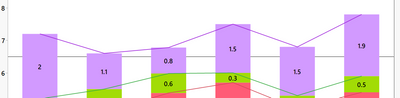
Many thanks
Accepted Solutions


- Mark as New
- Bookmark
- Subscribe
- Mute
- Subscribe to RSS Feed
- Get Direct Link
- Report Inappropriate Content
Re: Adding a Horizontal Reference Line With Color and Thickness Adjustment
Add:
Pen Size( 2 );
Pen Color( red );
with of course your thickness and color.
These commands are all documented in the Scripting Guide and Scripting Index.
I strongly suggest you read the Scripting Guide, and that you familiarize yourself with the Scripting Index. It will make your journey into JMP fare more pleasant and more productive.

- Mark as New
- Bookmark
- Subscribe
- Mute
- Subscribe to RSS Feed
- Get Direct Link
- Report Inappropriate Content
Re: Adding a Horizontal Reference Line With Color and Thickness Adjustment
Hi,
You will need to add a couple of commands before the H Line (Y) command:
- Pen size (3) (or any size in pixel you would like)
- Pen color (blue) (or whatever color recognized by JMP)
- Line Style ("Dotted") (or "Solid", "Dashed")
I hope it helps.
Best,
TS
- Mark as New
- Bookmark
- Subscribe
- Mute
- Subscribe to RSS Feed
- Get Direct Link
- Report Inappropriate Content
Re: Adding a Horizontal Reference Line With Color and Thickness Adjustment
Add:
Pen Size( 2 );
Pen Color( red );
with of course your thickness and color.
These commands are all documented in the Scripting Guide and Scripting Index.
I strongly suggest you read the Scripting Guide, and that you familiarize yourself with the Scripting Index. It will make your journey into JMP fare more pleasant and more productive.
- Mark as New
- Bookmark
- Subscribe
- Mute
- Subscribe to RSS Feed
- Get Direct Link
- Report Inappropriate Content
Re: Adding a Horizontal Reference Line With Color and Thickness Adjustment
Thanks for solution. I'll take a look at the scripting guide.
- Mark as New
- Bookmark
- Subscribe
- Mute
- Subscribe to RSS Feed
- Get Direct Link
- Report Inappropriate Content
Re: Adding a Horizontal Reference Line With Color and Thickness Adjustment
Hi,
You will need to add a couple of commands before the H Line (Y) command:
- Pen size (3) (or any size in pixel you would like)
- Pen color (blue) (or whatever color recognized by JMP)
- Line Style ("Dotted") (or "Solid", "Dashed")
I hope it helps.
Best,
TS
- Mark as New
- Bookmark
- Subscribe
- Mute
- Subscribe to RSS Feed
- Get Direct Link
- Report Inappropriate Content
Re: Adding a Horizontal Reference Line With Color and Thickness Adjustment
Thank you for your solution.


- Mark as New
- Bookmark
- Subscribe
- Mute
- Subscribe to RSS Feed
- Get Direct Link
- Report Inappropriate Content
Re: Adding a Horizontal Reference Line With Color and Thickness Adjustment
Hello @HCC,
This is more for your own information and for those who do not script. You can add a reference line by right clicking on the axis of choice and select Axis Settings. The lower right corner of the UI is dedicated to adding reference lines including thickness and color.
HTH
Bill

 Community Manager
- Mark as New
- Bookmark
- Subscribe
- Mute
- Subscribe to RSS Feed
- Get Direct Link
- Report Inappropriate Content
Re: Adding a Horizontal Reference Line With Color and Thickness Adjustment
Plus, @HCC , re: Bill @Bill_Worley descibiing interactive approach, please remember that most of what you do interactively you can save to script and then edit/incorproate the saved JSL into other scripts.
Recommended Articles
- © 2026 JMP Statistical Discovery LLC. All Rights Reserved.
- Terms of Use
- Privacy Statement
- Contact Us